A common misconception is that all backups are automatically reliable and will protect you in times of need. Nothing could be further from the truth!
Here's why: often, you don't find out that your backup failed until you go to restore, and by then it's too late!
Backups can fail for many reasons:
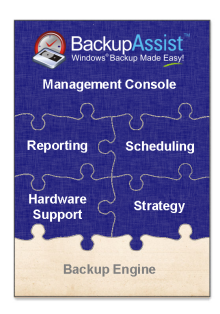
That's why of the 6 major areas in BackupAssist (refer to the diagram on the right), the top 5 areas are focused on management and procedures - all to make the final element (the backup engine itself) work.
And because they all come built-into BackupAssist, it means that you get a reliable and complete backup system "out of the box"!
Two key benefits of this approach are:
By building the management features into BackupAssist, it greatly minimizes any additional work that you have to do, because everything required comes out of the box!
The first time through the wizard, it will roughly take 7-10 minutes. But if you're like the majority of our users, you'll find that after you've used BackupAssist a few times, it will...
By providing step by step, "join-the-dots" instructions for the client to follow, you can safely delegate important procedures to just about anyone. It just can't get any simpler than that!
The next few pages will show you the secrets to making your backups reliable and foolproof.