Modifying backup tasks
There may be times when you want to change the backup task's details. For example, you may want to change what is being backed up or where the data is stored.
To edit a backup task:
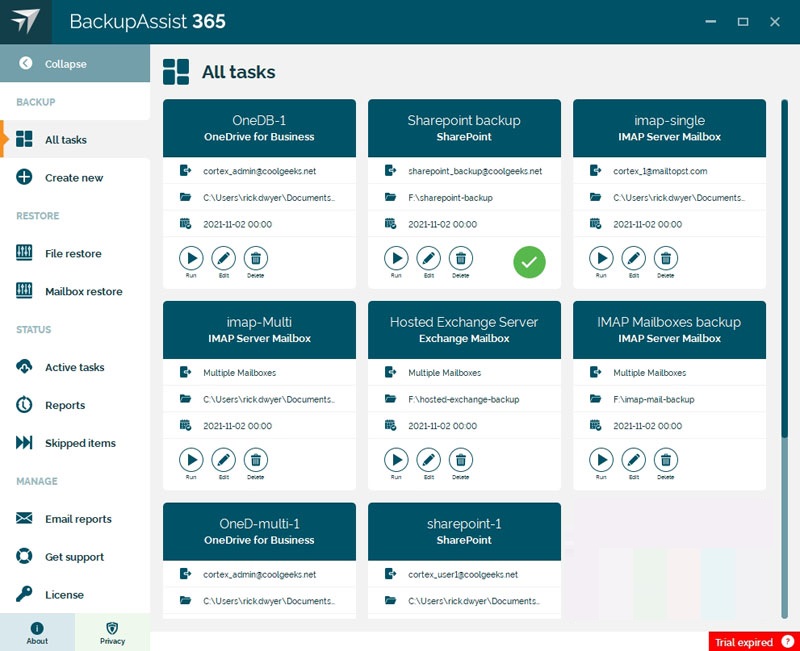
- Click All tasks on the left menu.
- Locate the backup task you want to change.
- Click the Edit button.
- Select the tab with the information you want to update.
- Update the information and click the tick to save your changes.
The Edit screens are the same as the create task screens. All the information you previously entered can be updated, except the Multi-User and Single-User type of task selections, if versioning is used, and if encryption is used.
Did you find this helpful?
Sorry about that
Why wasn't this helpful? (check all that apply)
Thanks for your feedback.
Want to tell us more?
Support requests are not logged from this dialog. If you require technical assistance, please contact support.
Great!
Thanks for taking the time to give us some feedback.
Great!
Thanks for taking the time to give us some feedback.
Still need help?
Contact us via phone or email to get the support you need.
Our business hours are Monday - Friday 9am-5pm US Eastern Time.



© 2025. BackupAssist™ and the intellectual property contained
within this document is the property of Cortex IT Labs Pty Ltd.