Test/Specific Backups
Contents: |
|---|
How to Perform a Test Backup
Once you have configured your backup job and prepared your tapes you may like to perform a test backup to verify that you backup job has been satisfactorily setup and works before you begin to schedule it regularly.You should also perform test backups each time you alter your backup job settings in any way to ensure that it still backs up successfully.
1. Select the 'Tools Tab' in BackupAssist™
2. Ensure your backup media is available and click 'Perform test backup now'
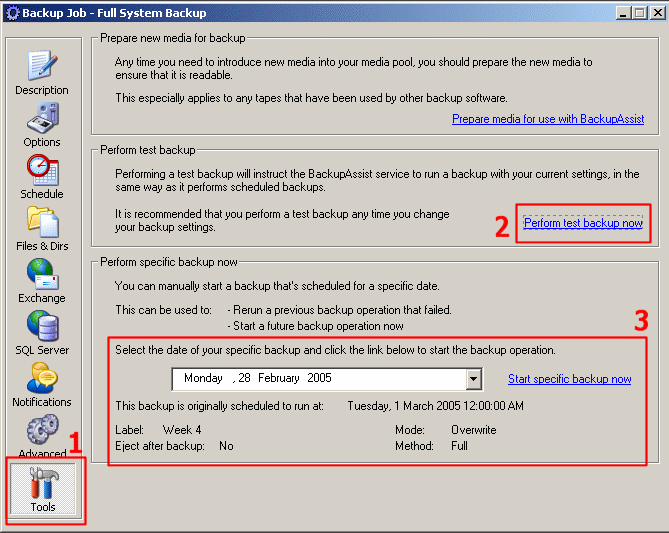
Figure 1: Performing a test backup with BackupAssist™
back to top
How to Perform a Specific Backup
You may also want to test specific backups, particularly if you have configured a custom rotation scheme involving different settings for different backup days in your backup schedule (i.e. Full Backups on Monday, differentials on Tues-Fri).
1. Select the 'Tools Tab' in BackupAssist™ (Figure 1)
2. Ensure your backup device is available, select the day's backup to commence and click 'Start specific backup now' (Figure 1-3)
If you are backing up to tape ensure that your tape media is in the drive, or if you are backing up network devices, please ensure they are online and able to be connected to.