|
Error code |
Product |
Applies to |
|---|---|---|
|
BA2902 |
BackupAssist |
BackupAssist v8.3 and later |
Description
The backup job was unable to run with the Shadow Copy Protection disabled, and ran with Shadow Copy Protection enabled.
Resolution
This error will require the assistance of BackupAssist technical support to identify the correct way to proceed.
Please send technical support a copy of the BackupAssist diagnostics file.
To contact BackupAssist Technical Support and provide diagnostic information, please click on the applicable section below and follow the steps provided.
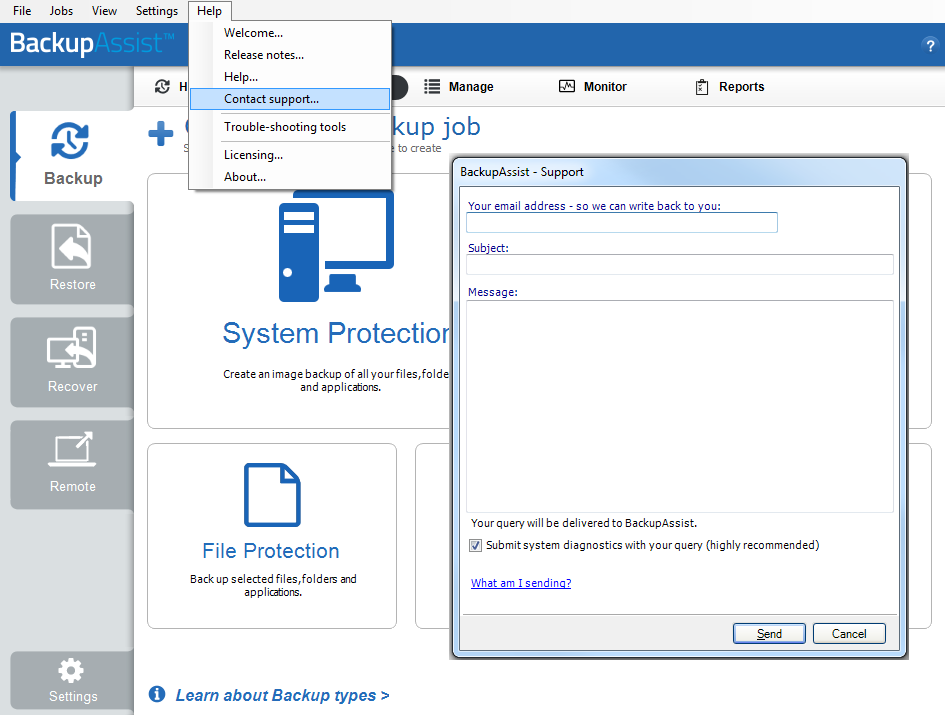
 If you are using BackupAssist v9.5.1 or later
- Open BackupAssist.
- Select Help from the menu at the top of the BackupAssist console.
- Select Contact Support ... from the drop-down menu. This will open the BackupAssist - Support dialog.
- Enter the details in the fields provided.
- Make sure the Submit system diagnostics to help with your query tick box is checked. This will zip your BackupAssist settings so technical support can review these specifically for your environment.
- Select Send.
BackupAssist technical support will review your message and diagnostics, and contact you to help resolve the problem.
If you are using BackupAssist v9.5.0 or earlier
- Open BackupAssist.
- Select Help from the menu at the top of the BackupAssist console.
- Select Feedback and Support … from the drop-down menu.
- Select Contact support. This will open the BackupAssist - Support dialog.
- Enter the details in the fields provided.
- Make sure the Submit system diagnostics to help with your query tick box is checked. This will zip your BackupAssist settings so technical support can review these specifically for your environment.
- Select Send.
BackupAssist technical support will review your message and diagnostics, and contact you to help resolve the problem.
|
Last updated |
Created |
Further assistance |
|---|---|---|
|
29th Jan 2015 |
28th Jan 2015 |
BackupAssist Support page |