|
Error code |
Product |
Applies to |
|---|---|---|
|
BA416 |
BackupAssist |
BackupAssist v4 onward |
Description
This error occurs when the backup is being verified for consistency after being burnt to the CD/DVD/Blu-ray disk.Resolution
Perform a scan disk check on the source drive to make sure there are no bad sectors or corruptions on the drive.Try backing up to an alternate destination and see if the verification of the backup file fails again. If it doesn't fail, then try another CD/DVD/Blu-ray to see if it was an issue with that particular disk. Also try another burner to eliminate being a hardware issue.
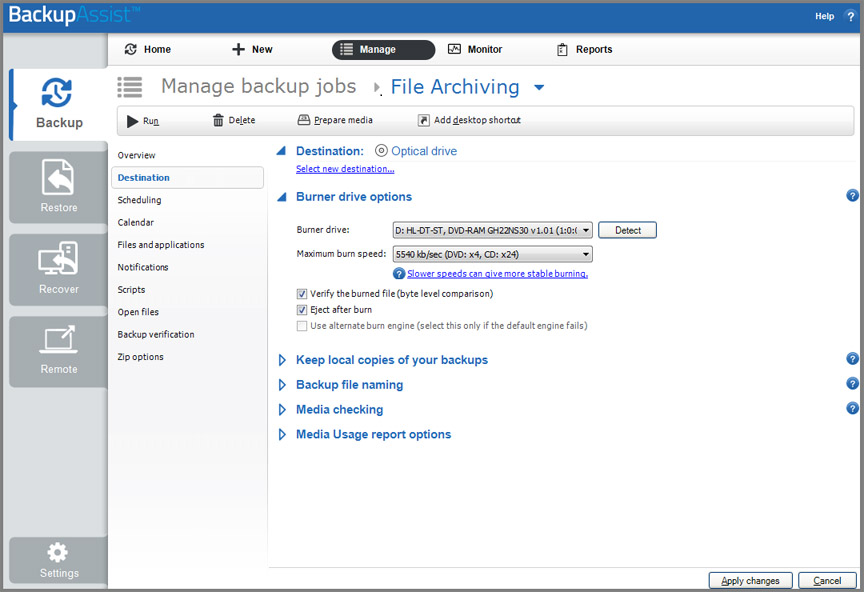
You can try using the alternate burning component that comes with BackupAssist. To use this follow the steps below:
1. Open BackupAssist
2. Click on 'Jobs' at the top of the BackupAssist console and select the particular job you need to change from the list provided.
3. Click on 'Destination' down the left hand side.
4. Under 'Burner drive options' tick 'Use alternate burning engine' (see screen shot below):
Last updated | Created | Further assistance |
|---|---|---|
10th Aug 2009 | 16th Mar 2007 | BackupAssist Support page |