Manage subscriptions
You can use MBC to manage BackupAssist Classic subscriptions, and the Free Period for BackupAssist Classic and BackupAssist ER.
Manage BackupAssist Classic subscriptions
To manage your subscriptions:
-
Log into MBC.
-
Select Installations.
-
Locate the installation.
-
Select Manage Subscription.
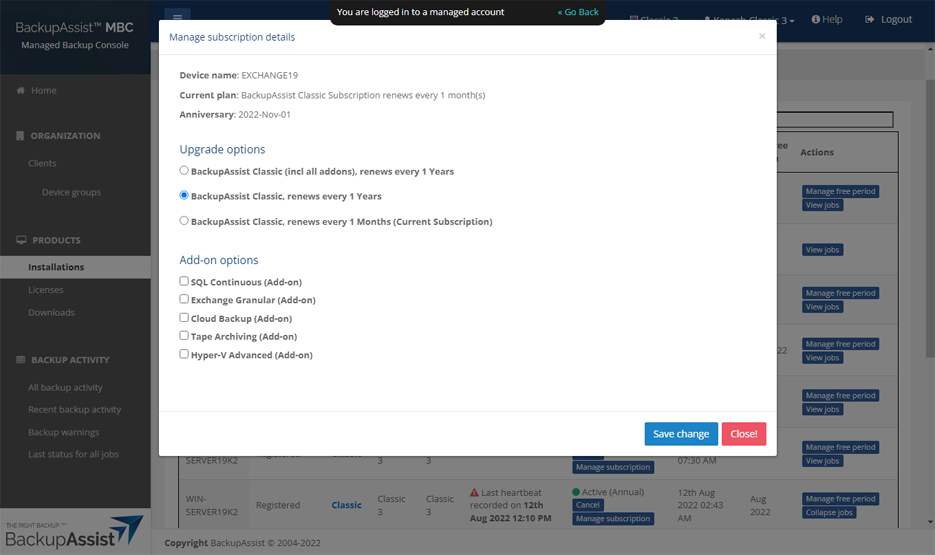
The Manage subscription details screen will open.
-
Select one of the a monthly or annual subscription options:
-
BackupAssist Classic complete, renews every 1 Years - includes unlimited add-ons at a fixed annual price.
-
BackupAssist Classic, renews every 1 Years - select the required add-ons from the Add-on options. The price will be capped at the same price as BackupAssist Classic complete.
-
BackupAssist Classic, renews every 1 Months - you will be charged at the end of each month for each add-on used. The price will be capped at the same price as BackupAssist Classic complete.
-
Manage BackupAssist Classic and ER Free Periods
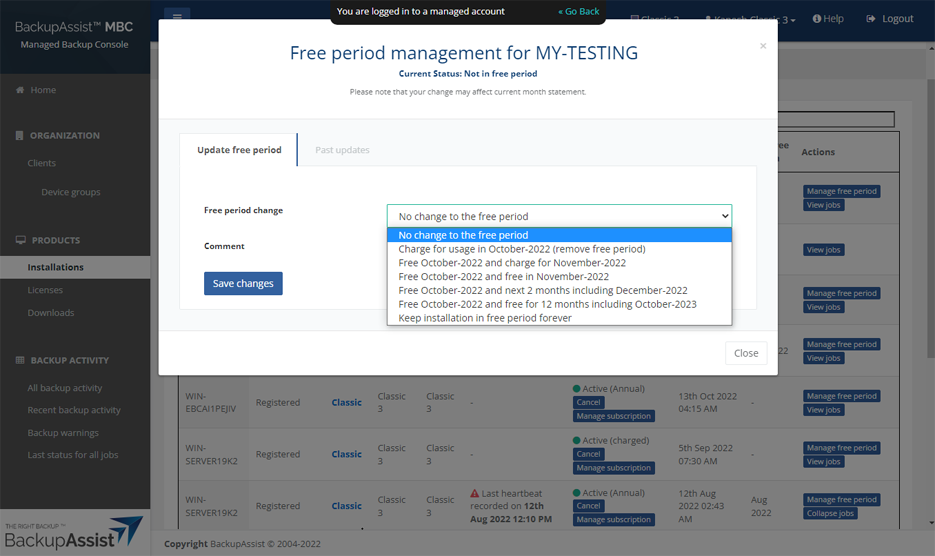
This option allows the MSP to control the free period for their clients.
To manage the Free Period:
-
Log into MBC.
-
Select Installations.
-
Locate the installation.
-
Select Manage Free Period from the Actions column.
The Free period management screen will open.
-
Use the options available to extend or shorten the free period.