BA6120: Delete file error
| Error code | Product | Applies to |
|---|---|---|
| BA6120 | BackupAssist ER | BackupAssist ER v1 and later |
Description
This error occurs when the backup job cannot delete a file.
Possible causes include:
- The file does not exist.
- The file is read - only.
- The job does not have delete permission.
- The file is opened by another app like AV.
Resolution
To contact BackupAssist technical support and provide diagnostic information, please follow the steps below.
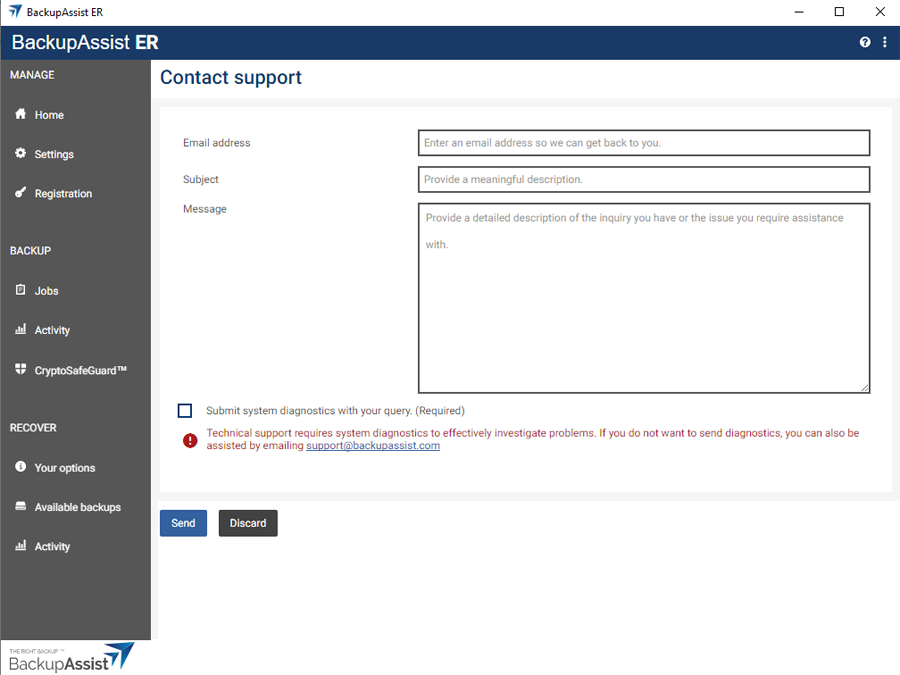
- Click the help icon on the top right.
- Select the Contact support.
- Enter your email address onto the field provided.
- Enter a meaningful description into the field provided.
- Tick the box next to Submit system diagnostics with your query.
- Select Submit.
BackupAssist Technical Support will review your problem and diagnostics file, and contact you.
| Last updated | Created | Further assistance |
|---|---|---|
| 27th July 2018 | 27th July 2018 | BackupAssist Support page |