
 Belgium
 Canada
 Germany
 Italy
Italy France
 Spain
Spain United Kingdom
BackupAssist launches v7 with NEW Central Administration, NEW User Interface and a NEW Brand.
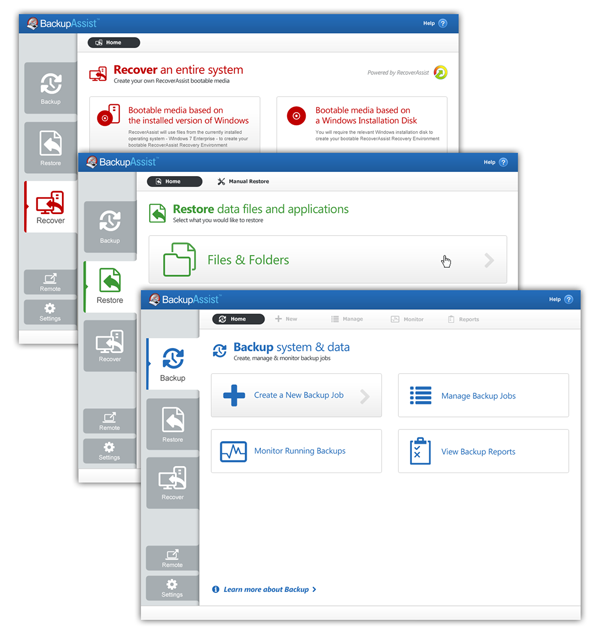
The new BackupAssist v7 User Interface (UI)
The new BackupAssist
Introducing BackupAssist v7 - affordable, reliable, simple and fast Backup and Disaster Recovery software.
BackupAssist v7 is our most ambitious release yet. A brand new and re-designed User Interface that makes backup and disaster recovery simple, reliable and fast. Guided tools to simplify restoration and recovery of your data, systems and servers. A new web console so you can remotely start, stop, enable, disable and edit backup jobs. Simplicity, reliability and affordability in one package, and all wrapped up a whole new brand.
With more features than ever, BackupAssist v7 makes it easier and simpler to:
- Backup - effortlessly backup your IT infrastructure, both systems and data
- Restore - rapidly retrieve your data from backup
- Recover - swiftly rebuild your entire system from a backup
Packed with a ton of new features, BackupAssist v7 is enterprise-level software at a price small and medium businesses can afford. Some of the key new features in BackupAssist v7 include:
Work remotely with Central Administration
This timesaving new feature allows you to manage and monitor all BackupAssist instances remotely from a single browser interface within your LAN. You can stop, start, enable and disable backup jobs and even open remote sessions of the full Backup Console.
New enhanced User Interface (UI)
BackupAssist v7 contains a completely redesigned UI which is clearer and more intuitive for both everyday users and more technical professionals.
Support for the new Windows 8 and Server 2012 families
BackupAssist v7 is ready to cover your systems and data if you want to become an early adopter of the new Microsoft operating systems including Windows 8, Server 2012 and SQL Server 2012.
And the new brand
In the run up to the launch of BackupAssist v7 we came up with the idea that we should refresh our brand and our website - give them a new look and feel.
We are extremely pleased with the results: a new brand that is light, modern and consistent. Just like BackupAssist v7.
One of the main reasons for the rebrand is so that our website is in keeping with the new design for Version 7 of BackupAssist. The interface in v7 is all about white space, big blocks and primary colors and our new website reflects and continues these.
We've taken some time serious time to think about and then overhaul our support section. While we were looking at the Support Home Page, we took a look at our Document Section and saw that we could do things much better:
- We have completely updated the content for each document
- To help you find documents we've made each one a webpage rather than just a PDF (although you can still download PDF versions)
- We rearranged the Documents page and it is now categorised by support case rather than by arbitrary (and confusing) document types
I'm sure you can imagine we've been busy, but there is still plenty to do. We've got to get onto the reseller portal, the knowledge base, the forum and a few others.
Thanks for sticking around,
PS let us know if you find anything that isn't working at webteam@cortexit.com


