Amazon S3 cloud destination
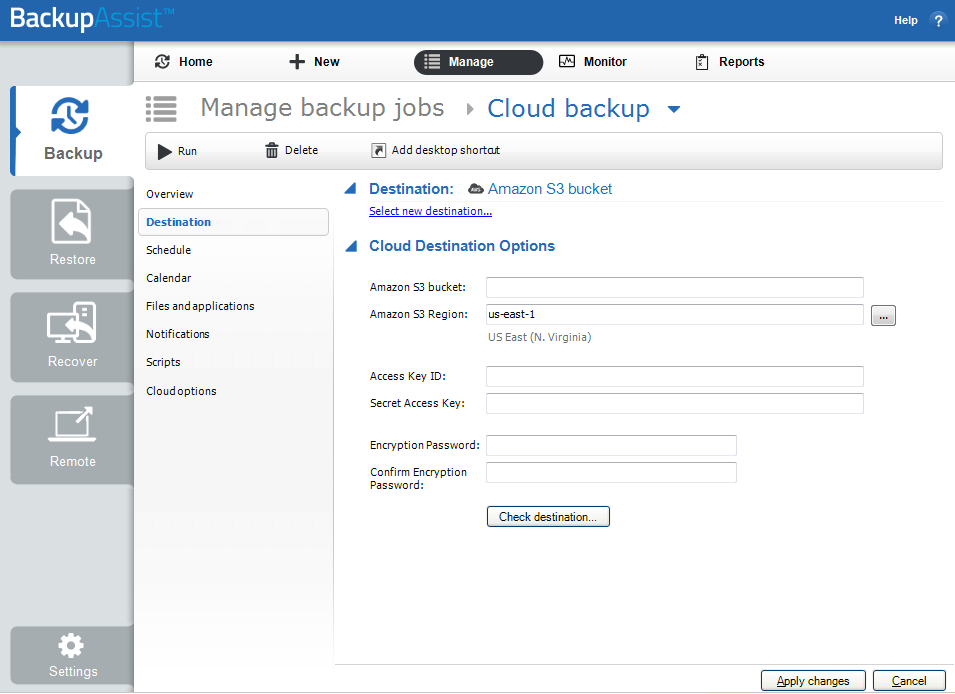
Cloud destinations are storage services that are accessed across the internet. For example, Microsoft Azure and Amazon S3. This section explains the options available when you edit a Cloud Backup job that uses an Amazon S3 destination. These options are on the Destination screen: to show it, edit your backup job and then select Destination from the list on the left.
Amazon S3 bucket
Amazon Web Services (AWS) allow you to create S3 buckets that can be used as backup destinations.
Amazon S3 bucket options
-
Amazon S3 bucket
Enter a name for your S3 bucket. BackupAssist will use this name to create the bucket. Provide a different name for each job, because a different bucket must be used by each backup job. This name must follow the conventions explained in Amazon's naming guide.
-
Amazon S3 Region
Select the region for the data center where you want your cloud storage to be based.
-
Access Key ID & Secret Access Key
For this step, you will need to open the csv file that you saved when you created the IAM user account that this job will use. This csv file contains the Access Key ID and Secret Access key.
Copy these keys from the csv file to the fields provided.
Note
The secret access key can only be retrieved when it is created, and must be securely stored for security reason.
-
Encryption Password
Cloud Backup uses encryption to protect your data. Enter and confirm an encryption password. This password will be needed if you perform a restore.
Note
It is important that you keep a copy of your password in a safe place, as we cannot retrieve passwords if they are lost or forgotten.
Note
If you like to create an immutable cloud backup, follow the additional instructions in cloud-immutability.
-
Check destination
Select the Check destination button. This important step uses the information provided to test the connection to the cloud destination, and then creates the cloud container that the backup job will use.
To change an existing backup job's settings, you may first need to change or access information using your AWS portal.
To learn about storage costs and requirements, see Estimating cloud storage