Backup user identity
A Backup user identity (BUI) is the Windows account used to run your backup jobs. Once it is configured, every backup job uses it.
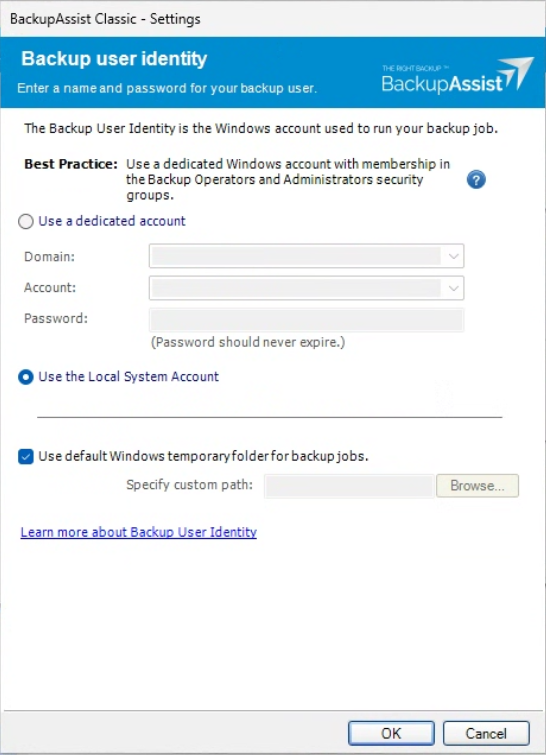
Selecting a Backup user identity
You are asked to select a BUI the first time you create a backup job. For new jobs the BUI step appears before Set up destination.
To select a Backup User Identity:
-
Use the radio button to select the account type.
Use a dedicated account (recommended) - This allows you to select a Windows account from the list provided. Best practice is a dedicated Windows account that is a member of the Backup Operators and Administrators security groups.
Use the Local System Account - This is a built-in Windows account that is used to run Windows services. It can be used by BackupAssist but you will need to check that the account has the required administrator access before using it.
-
If you selected Use a dedicated account, select the Domain and the Account. You can change the domain if the account you want is not in the default domain.
-
Enter the selected account's Password. The password should never expire.
-
Leave Use default Windows temporary folder for backup jobs ticked, or untick it and use Specify custom path to choose a different folder.
-
Select OK.
This account will now be used by BackupAssist for all backup jobs.
Note
A NAS destination may also require NAS credentials to be entered in the Set up destination step. BUI accounts and their passwords should not expire.
Editing the Backup user identity
You can open the Backup User Identity screen to view the options or the change the current account selection.
To open the Backup user identity screen:
- Select the Settings tab.
- Select Backup user identity.