Jobs list
The Jobs list allows you to run and administer backups. When the Jobs list tab is selected, a list of all backup jobs will be displayed, along with the results of the last backup, the backup's duration and if the backup job is active or disabled.
Using the Action Buttons

The Jobs list tab has the following action buttons, which are applied to the selected backup job:
-
Report opens the most recent backup report.
-
Run starts the backup job. You will be prompted to Rerun a past backup or to Run a future backup. If you select a future backup, you will be asked to provide the date.
-
Enable / disable changes the active status of the backup job. This option can be used to disable a backup job so it will not run, or to enable a job to run as scheduled.
-
Edit is used to change the backup job's configurations. When you select Edit, the Manage menu will change and display 4 options: Run, Delete, Prepare media (if the job uses a removable media) and Add desktop icon.
To learn how, see Edit a backup job.
Prepare Media
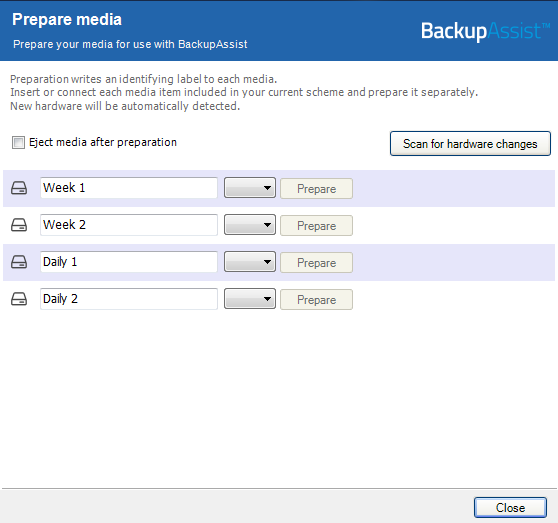
When you select a backup job that uses removable media as the backup destination, a Prepare media button will appear. This button will open a Prepare Media dialog. The dialog is used in the same way as the Prepare media step, when creating a new backup job.
Each media will have a default label name based on your backup schedule, a drive designation drop-down and a Prepare button. A Prepare button becomes selectable when its media is attached.
To prepare the media:
- Attach the removable media devices. If you can only attach one media at a time, repeat the steps for each media.
- Change the label's description if you do not want to use the default description.
- Select the drive designation.
- Select Prepare. This will initiate the preparation and labeling process.
If you selected BitLocker encryption, the Prepare media button will mark those drives for encryption. The encryption process will be initiated by the final backup job creation step. To learn more, see BitLocker Encryption guide.
-
Clone creates a copy of the backup job, and provides a field to enter a new name.
-
Delete deletes the backup job from BackupAssist.