BA6101: The backup job was canceled by the user
| Error code | Product | Applies to |
|---|---|---|
| BA6101 | BackupAssist | For BackupAssist 10 or later. |
Description
This error occurs when a backup administrator cancels the backup job or another process ends the job.
Resolution
There are 2 possible resolutions for this problem.
Resolution 1 - Restart the backup job
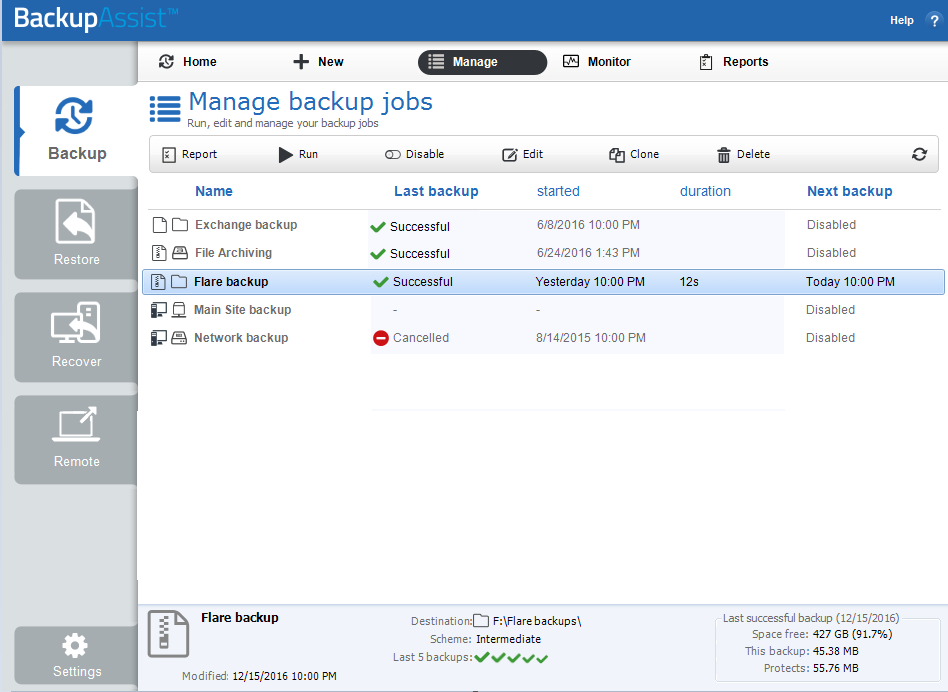
If a user clicked on the cancel button on the Manage screen, while a backup job was running, you can rerun the backup job.
To manually rerun the backup job:
- Open BackupAssist
- Click on Manage Backup Jobs
- Select the backup job from the list provided.
- Click Run on the top menu.
Resolution 2 - Check for process conflicts
Processes that are running at the same time as BackupAssist can interfere and could cause this error.
Check that you are not running the following processes at the same time as your backup job:
-
Anti-virus scans (including live scanning features)
It is recommended that all anti-virus processes are disabled while the backup job is running to avoid any conflicts. If you are not sure how to configure this, you may need to contact your anti-virus vendor for assistance.
Try placing an exception for BackupAssist within or disable your anti-virus software and run the backup again to see if the error is generated again. If it is, then it means that your anti-virus is marking BackupAssist as a threat to your system. To re-configure your anti-virus avoid such a conflict, we recommend that you contact your anti-virus support vendor for further advice.
-
Defragmentation processes
More information on this process is located at http://windows.microsoft.com/en-au/windows/improve-performance-defragmenting-hard-disk#1TC=windows-7.
-
Consistency checks such as chkdsk scans
Please review the following document from Microsoft on the use of chkdsk: https://technet.microsoft.com/en-us/magazine/ee872425.aspx
If any of the problems described in the article are occurring, reschedule one of the processes to a later time to avoid the conflict.
| Last updated | Created | Further assistance |
|---|---|---|
| 18th Oct 2023 | 18th Oct 2023 | BackupAssist Support page |