BA10: An error occurred when running the script
| Error code | Product | Applies to |
|---|---|---|
| BA10 | BackupAssist | BackupAssist v4 or later. |
Description
This error occurs if you have a script that runs either before or after your backup job.
Note
Our support team will not write scripts to perform tasks. However, they can give basic guidance and instructions on how scripts work in and execute within BackupAssist.
Resolution
Resolution 1 – Check the script runs correctly through command prompt
BackupAssist runs scripts in the same way they run through a command prompt window. You should therefore start by checking that the script you are running can execute correctly using an elevated command prompt window.
If this fails, then it is most likely to fail within BackupAssist and the script will need to be adjusted until proven as working.
Resolution 2 – Place script within a batch file and execute the batch file through BackupAssist
If the script that you are running is successful when run directly through a command prompt (see Resolution 1 above) but still encounters errors while running through BackupAssist, you should run the script from a batch file and call the batch file from within BackupAssist.
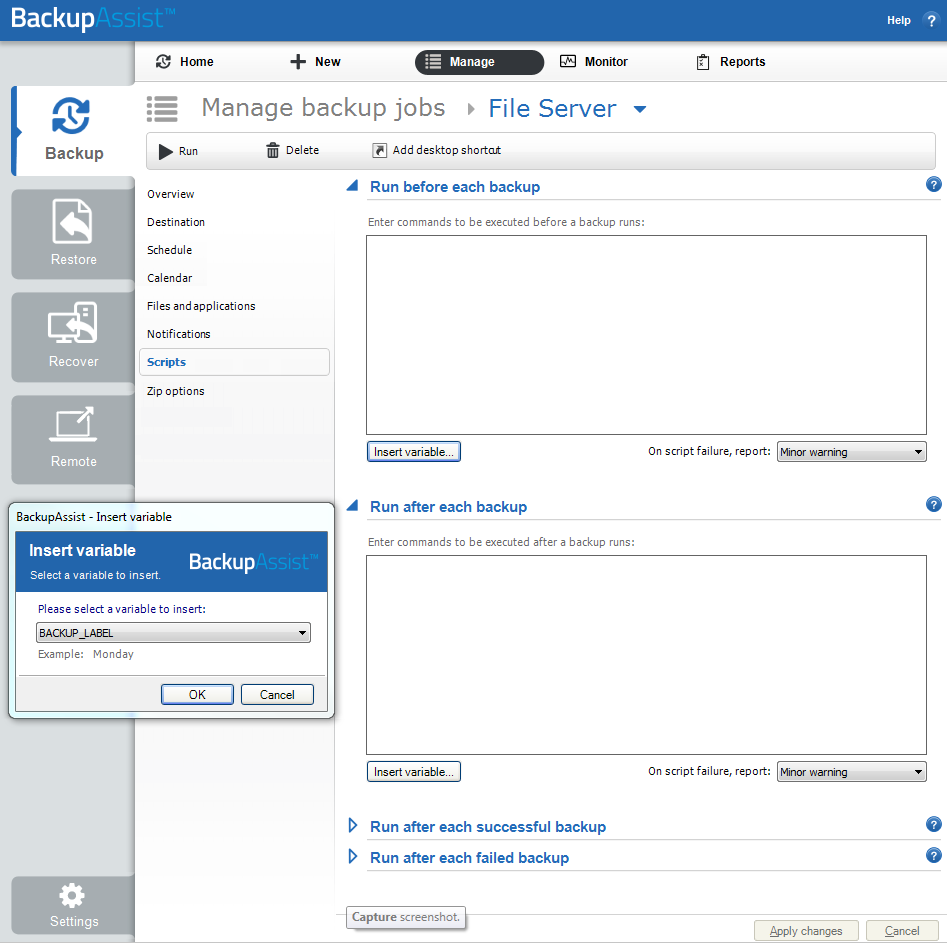
You can then place the execute command in the applicable script box using the steps below:
- Open BackupAssist.
- Select Manage Backup Jobs
- Select the backup job.
- Select Edit from the top menu
- Select Scripts from the options on the left
| Last updated | Created | Further assistance |
|---|---|---|
| 8th Apr 2016 | 16th Mar 2007 | BackupAssist Support page |