BA1756: Exmerge must be installed for the mailbox export to work.
End of life
Mailbox Protection reached end of life on 28 February 2017 and is not part of BackupAssist v10 and later. This article applies to BackupAssist v9 and earlier, which no longer receive technical support. See Software end of life.
| Error code | Product | Applies to |
|---|---|---|
| BA1756 | BackupAssist | Exchange 2000 and 2003. BackupAssist v4 and later. |
Description
This error usually means that Exmerge is either not installed on the machine doing the Exchange backup, or is installed in a different location to C:\Program Files\Exchsrvr\bin where BackupAssist assumes it to be installed.
Resolution
Resolution 1 - If Exmerge is not installed on the machine.
Go into BackupAssist and try adding an Exchange server to which you want to backup. You will then get the following (or similar) popup appear:Once you click the 'Install' button, Exmerge will be installed and you shoul d be able to select the information stores / mailboxes you wish to backup.
Note
You need Exchange Management tools to install Exmerge. This is available on the Exchange CD or by download from Microsoft.
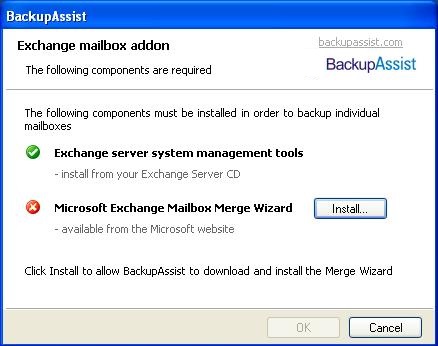
Resolution 2 - If Exmerge is already installed on the machine.
If you have already installed Exmerge on the machine, cut and paste the contents where the exmerge.exe file is located into C:\Program Files\Exchsrvr\bin.
| Last updated | Created | Further assistance |
|---|---|---|
| 20th Mar 2017 | 16th Mar 2007 | BackupAssist Support page |