BA1897: Failure configuring MAPI via the mapisvc.inf file
End of life
Mailbox Protection reached end of life on 28 February 2017 and is not part of BackupAssist v10 and later. This article applies to BackupAssist v9 and earlier, which no longer receive technical support. See Software end of life.
| Error code | Product | Applies to |
|---|---|---|
| BA1897 | BackupAssist | BackupAssist v5.4.6 to v9 |
Description
This error occurs when there is an issue with the mapisvc.inf file located at:
32-bit Operating Systems: c:\windows\system32
64-bit Operating Systems: c:\windows\sysWOW32
BackupAssist will automatically try to fix the issue, however doesn't have the correct permissions to.
Resolution
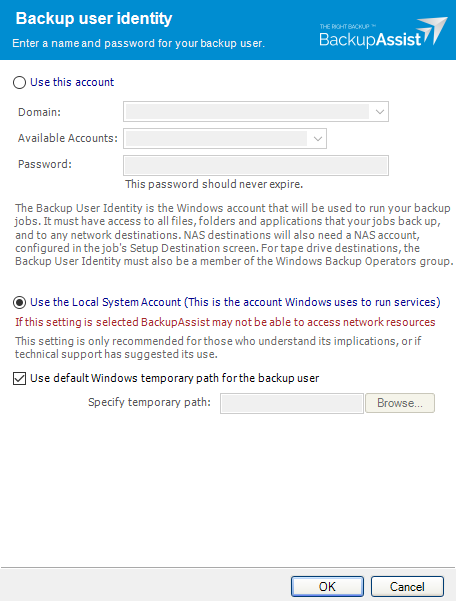
Check that your Backup User Identity has been set and has the required access. To view your current Backup User Identity, select the Settings tab > Backup User Identity and you'll see the following dialogue box appear.
Note
For BackupAssist 10.4.2 and earlier, the Backup User Identity is used for all backup jobs and the account may have been created with custom access levels. For 10.4.3 and later, a Backup User Identity is only required for Jobs that have a NAS destination or the SQL add-on, and in these cases, the Backup User Identity should be a member of the Administrators group.
What to check
- For BackupAssist 10.4.2 or earlier - check that the account is still selected, enabled and has the required access.
- For BackupAssist 10.4.3 and later, check that the account is still selected, enabled and a member of the administrators group.
- To check the permissions properly, you can log into the backup server using the Backup User Identity account and check that you can read and write to the backup destination without any authentication requests or errors.
- If backup account's password is changed in Windows, it will need to be changed in BackupAssist.
To learn more, see Backup user identity
| Last updated | Created | Further assistance |
|---|---|---|
| 1st Oct 2017 | 19th May 2010 | BackupAssist Support page |