BA213: A new or unrecognized tape is inserted
| Error code | Product | Applies to |
|---|---|---|
| BA213 | BackupAssist | BackupAssistV4 All operating systems |
Description
The tape that has been inserted into the drive has not been prepared for use within BackupAssist V4.
Resolution
There are 3 possible resolutions for this problem and each is described below.
Resolution 1 - Prepare the tape for backup
To prepare media follow the steps below:
- Open BackupAssist.
- Select Manage Backup Jobs.
- Select the backup job.
- Select Edit from the top menu.
- Select Prepare Media from the top menu.
- Attach the drive you want to be prepared.
- Click Prepare on the relevant media name.
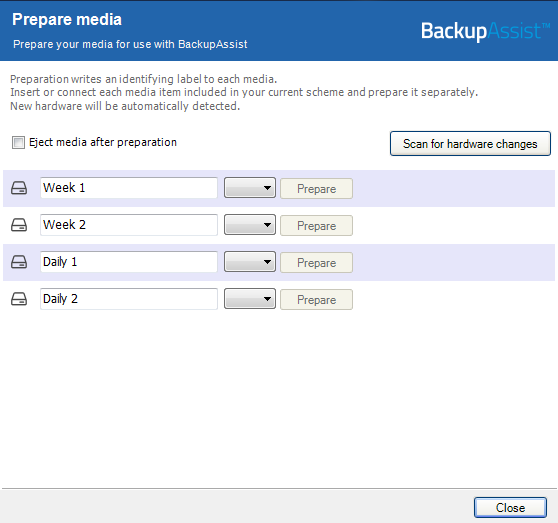
The media will then be assigned to that media label. For example a disk prepared for the 'Monday' label will be expected by BackupAssist each Monday.
The destination media will be assigned a media label. For example, a removable hard drive prepared with a Monday label will be expected by the backup job each Monday.
Resolution 2 - You don't wish to have BackupAssist manage your media
To stop BackupAssist from tracking which media is being used:
- Open BackupAssist.
- Select Manage Backup Jobs.
- Select the backup job.
- Select Edit from the top menu.
- Select Destination from the options on the left.
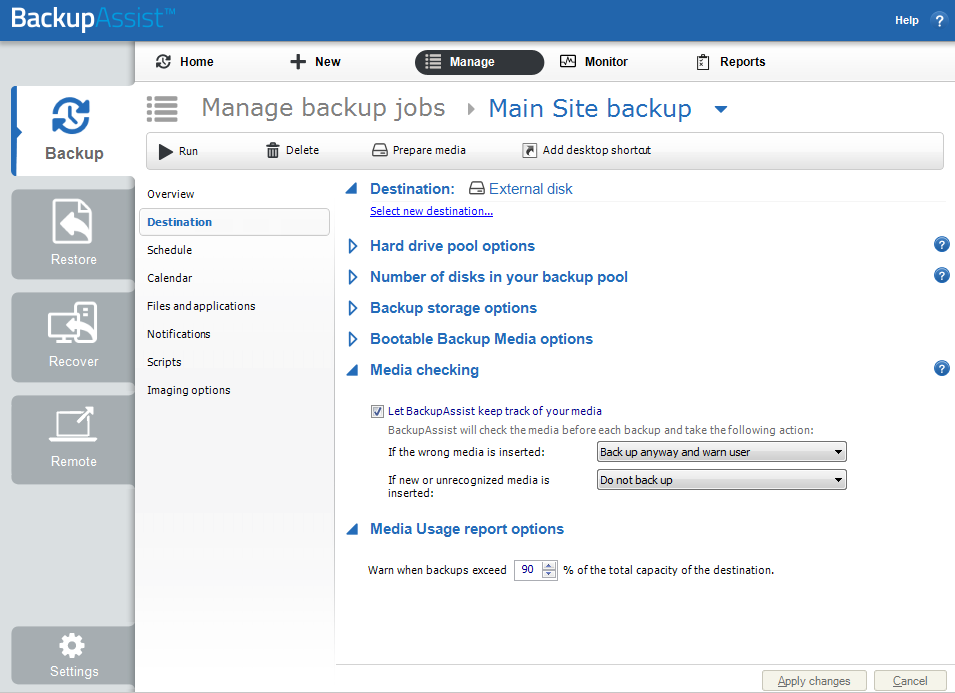
- Under the Media Checking section, untick Let BackupAssist keep track of your media.
Resolution 3 - Back up anyway and warn user
To stop BackupAssist from tracking which media is being used:
- Open BackupAssist.
- Select Manage Backup Jobs.
- Select the backup job.
- Select Edit from the top menu.
- Select Destination from the options on the left.
- Under the Media Checking section, next to If new or unrecognized media is inserted select Back up anyway and warn user.
| Last updated | Created | Further assistance |
|---|---|---|
| 8th June 2017 | 16th Mar 2007 | BackupAssist Support page |