BA233: A new or unrecognized GoVault cartridge is inserted
| Error code | Product | Applies to |
|---|---|---|
| BA233 | BackupAssist | Windows 2000 Windows Xp Microsoft SBS all Versions Windows Server 2000 Windows Server 2003 |
Description
The GoVault cartridge that has been inserted into the drive has not been prepared for use within BackupAssist V4.
Resolution
Preparation of media within BackupAssist V4 can be done either at the point of job creation or later from the Jobs Tab.
You will find the media preparation functions on the job wizard screen titled Label and Prepare Media.Simply insert your GoVault cartridges one by one and choose the Prepare button for the particular job schedule label that GoVault cartridge will be running.
As you are already past this stage if you are getting BA233 as part of your backup reports you will need to prepare your GoVault cartridge using the Manage Menu.
To prepare media follow the steps below:
- Open BackupAssist.
- Select Manage Backup Jobs.
- Select the backup job.
- Select Edit from the top menu.
- Select Prepare Media from the top menu.
- Attach the drive you want to be prepared.
- Click Prepare on the relevant media name.
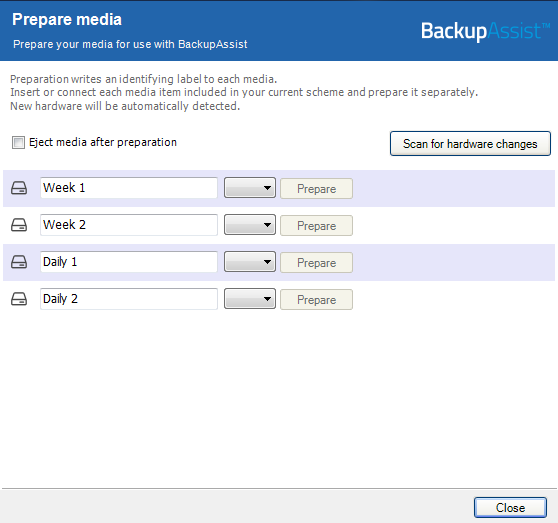
The media will then be assigned to that media label. For example a disk prepared for the 'Monday' label will be expected by BackupAssist each Monday.
Clicking prepare media will bring up a separate window that includes all the GoVault cartridge labels currently in your rotation schedule and you simply need to insert the GoVault cartridge and click the prepare button located to the side of the correct label.
| Last updated | Created | Further assistance |
|---|---|---|
| 18th Mar 2015 | 16th Mar 2007 | BackupAssist Support page |