BA2507: Another image backup is already running
| Error code | Product | Applies to |
|---|---|---|
| BA2507 | BackupAssist | BackupAssist v5 and later. |
Description
This error is usually caused when a Windows Server Backup job is running or additionally a 3rd party backup solution is also running at the same time.
Resolution
When running the backup, check Task Manager (Start > Run > Taskmgr) for any wbadmin.exe or BAExecutorWinApp processes which are running (see screen shot). If you do find either of these running, stop all instances and then try re-running the backup.
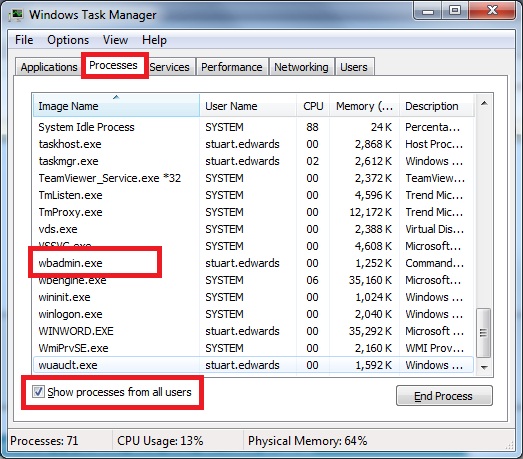
Make sure that you don't have a backup configured through the Windows Server Backup and also that you don't have any other 3rd party backup software configured which may cause conflicts with BackupAssist.
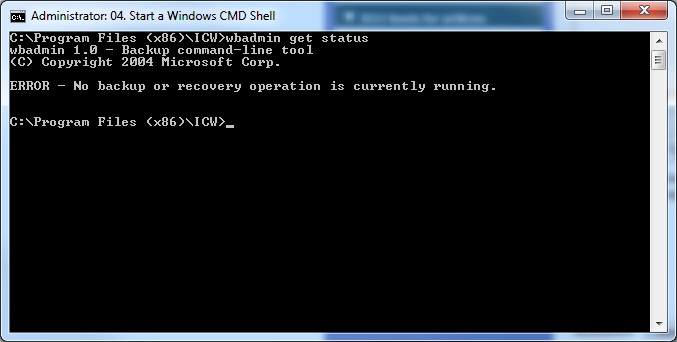
You can also check the status of wbadmin on your system by opening a command prompt window and typing the following command:
wbadmin get status
This will advise if Windows Server Backup is currently running a backup or not on your system:
| Last updated | Created | Further assistance |
|---|---|---|
| 02 August 2017 | 31st Aug 2008 | BackupAssist Support page |