BA2529: There was a problem mounting the virtual disk, probably due to a file system limitation
| Error code | Product | Applies to |
|---|---|---|
| BA2529 | BackupAssist | BackupAssist v5.4.6 and later |
Description
BackupAssist creates catalog files after the backup process has completed.
This warning typically occurs because of an issue with mounting the VHD file created by the imaging process. The result is that the backup job cannot fully catalog the file.
You may find that this is a once-off error that will not reoccur, so it is recommended to only try the resolutions if you see this error more than once.
Older versions of BackupAssist showed this error as "This version of Hyper-V does not support mounting from the selected file system type."
Resolution
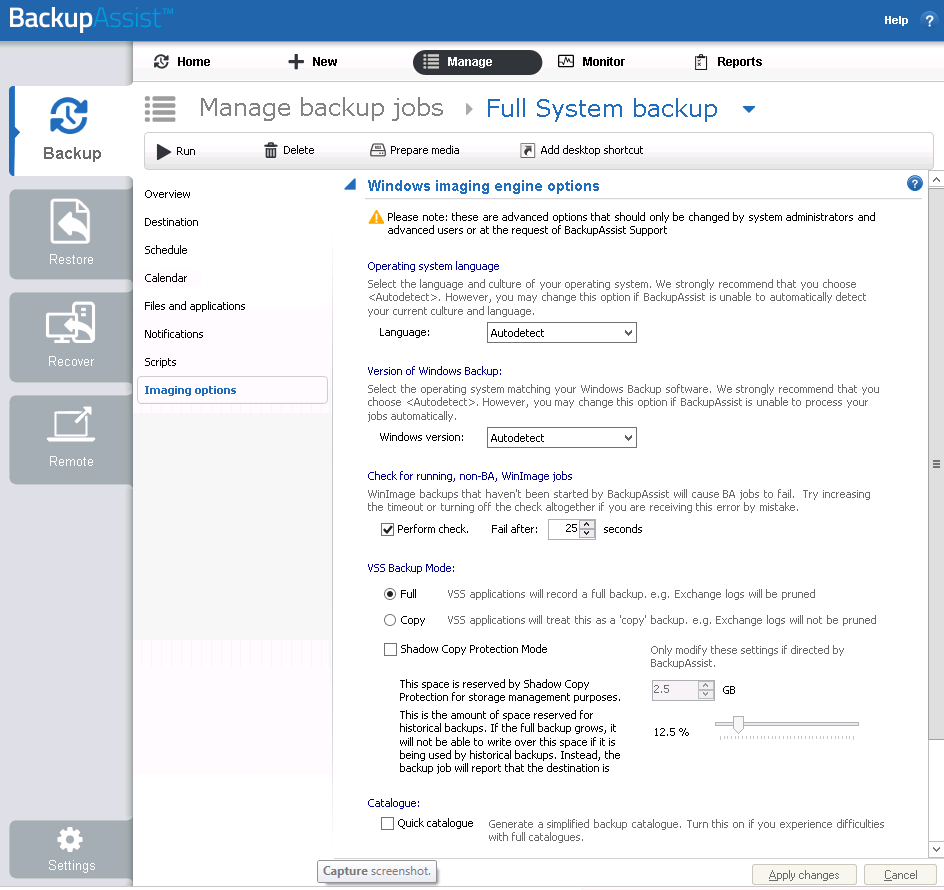
Enable Quick Catalog
The Quick Catalog option prevents the backup VHD from mounting after the backup, as this is the most common reason for this warning to occur. This means when you attempt to perform a restore, the backup's VHD will be mounted at the start of the restore process, not during it.
To enable Quick Catalog:
- Open BackupAssist.
- Select Manage Backup Jobs.
- Select the backup job.
- Select Edit from the top menu.
- Select Imaging Options from the options on the left.
- Tick the check box next to Quick Catalog
Windows 10 build 1903: update BackupAssist
If you are running Windows 10 build 1903, updating to BackupAssist 10.4.7 or later may also resolve this error.
| Last updated | Created | Further assistance |
|---|---|---|
| 14th Sept 2016 | 19th May 2010 | BackupAssist Support page |