BA296: Cannot compile media usage report.
| Error code | Product | Applies to |
|---|---|---|
| BA296 | BackupAssist | BackupAssist v5 and later |
Description
BackupAssist needs to traverse the backup destination to gather the information required to create an accurage Media Useage section in the backup report. If BackupAssist has problems getting the information required, this warning can occur.
Resolution
There are 2 possible resolutions for this problem.
Resolution 1 - Change the media usage timeout period.
Change the media usage timeout period by following the steps below:
- Open BackupAssist.
- Select Manage Backup Jobs
- Select the backup job.
- Select Edit from the top menu
- Select Replication Options from the options on the left
- Increase the Media Usage timeout option's time limit.
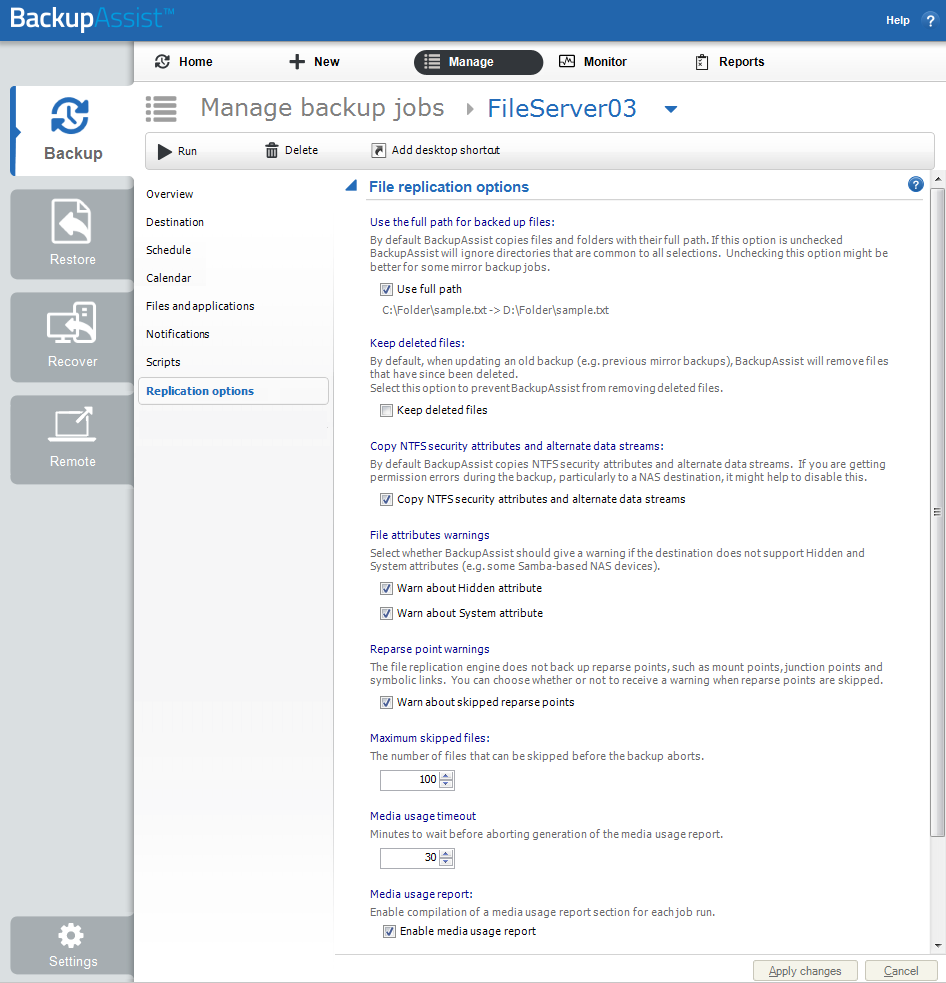
To learn more see Edit Job : Replication Options
Solution 2 - You don't wish to have the media usage report.
If you are using File Protection, you can stop the report from being generated by following the steps below:
- Open BackupAssist.
- Select Manage Backup Jobs
- Select the backup job.
- Select Edit from the top menu
- Select Replication Options from the options on the left
- Untick Enable media usage report.
To learn more see Edit Job : Replication Options
| Last updated | Created | Further assistance |
|---|---|---|
| 29th Oct 2015 | 03rd Jul 2007 | BackupAssist Support page |