BA297: Timeout compiling media usage report.
| Error code | Product | Applies to |
|---|---|---|
| BA297 | BackupAssist | BackupAssist v5 and later |
Description
The reason for this warning is that when the usage report is being generated, it usually has cached files for previous backups. However, if the files cannot be found, BackupAssist will go back through all the previous backups to generate the files again so that the reporting can be accurate. The default time out period is 30 minutes.
Resolution
There are 2 possible resolutions for this problem
Solution 1 - Change the media usage timeout period
Change the media usage timeout period by following the steps below:
- Open BackupAssist.
- Select Manage Backup Jobs
- Select the backup job.
- Select Edit from the top menu
- Select Replication Options from the options on the left
- Change Media Usage timeout to a larger time.
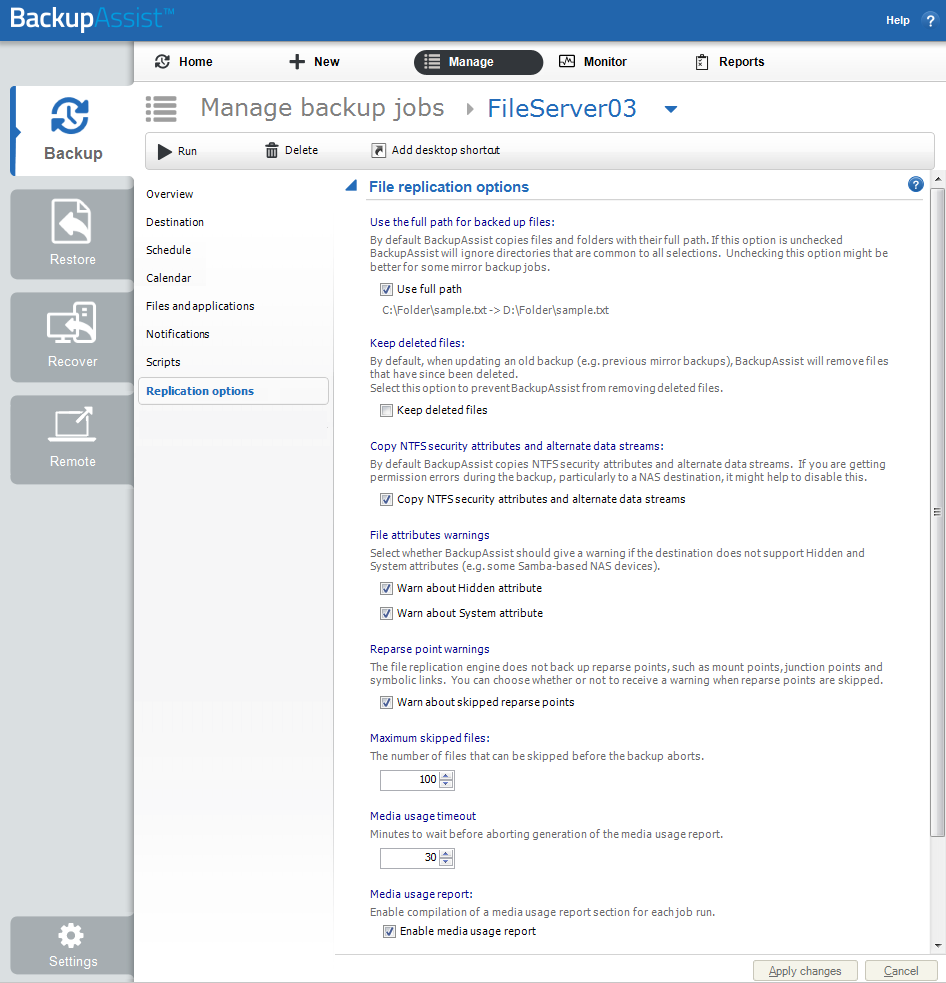
To learn more see Edit Job : Replication Options
Solution 2 - Don't generate the media usage report
If using File Protection BackupAssist can be stopped from generating the media usage report:
- Open BackupAssist.
- Select Manage Backup Jobs
- Select the backup job.
- Select Edit from the top menu
- Select Replication Options from the options on the left
- Untick Enable media usage report.
To learn more see Edit Job : Replication Options
| Last updated | Created | Further assistance |
|---|---|---|
| 06th June 2016 | 31st Jul 2009 | BackupAssist Support page |