BA3014: Error in IPC code
Superseded by newer technology
Rsync has been superseded by newer cloud backup destinations, and we strongly recommend using one of them instead (see Cloud Backup). Customers with older environments can continue to use rsync with the version of BackupAssist they have, but without technical support, which ended in November 2023.
| Error code | Product | Applies to |
|---|---|---|
| BA3014 | BackupAssist | BackupAssist version 5 |
Description
This error is usually thrown when there is an issue making a connection to the rsync server during the backup.
Resolution
The following online blog post as this contains a resolution for one potential issue which can cause this error to be thrown:https://www.backupassist.com/blog/support/rsync-error-socket-operation-on-non-socket/.
If this doesn't help resolve your rsync issue forward through some diagnostic information so that one of our technical support staff can look into your issue further.
To contact BackupAssist Technical Support and provide diagnostic information, please click on the applicable section below and follow the steps provided.
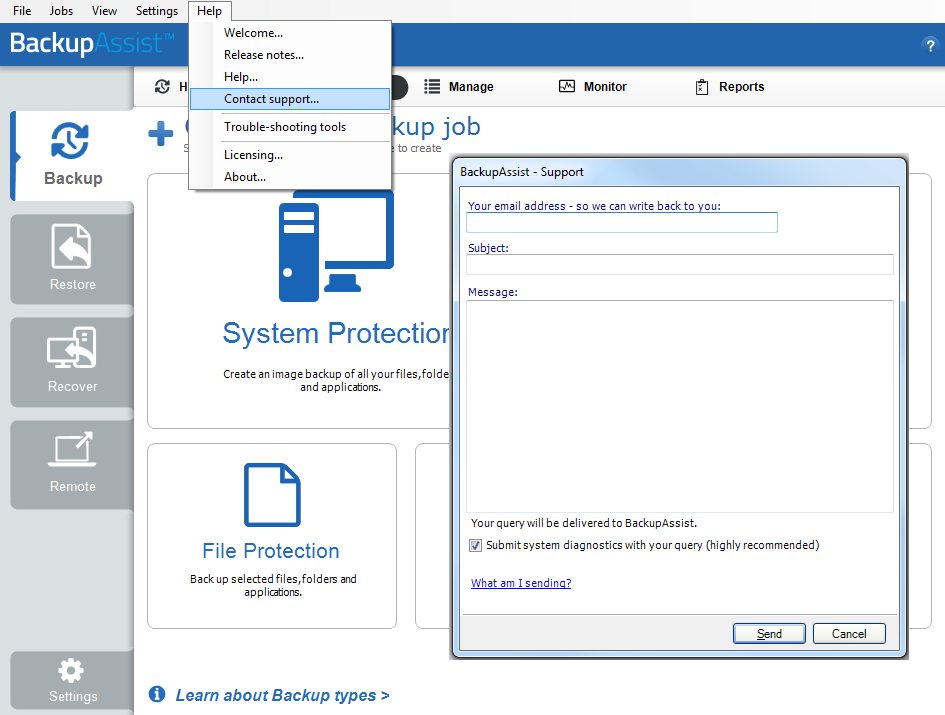
If you are using BackupAssist v9.5.1 or later
- Open BackupAssist.
- Select Help from the menu at the top of the BackupAssist console.
- Select Contact Support ... from the drop-down menu. This will open the BackupAssist - Support dialog.
- Enter the details in the fields provided.
- Make sure the Submit system diagnostics to help with your query tick box is checked. This will zip your BackupAssist settings so technical support can review these specifically for your environment.
- Select Send.
BackupAssist technical support will review your message and diagnostics, and contact you to help resolve the problem.
If you are using BackupAssist v9.5.0 or earlier
- Open BackupAssist.
- Select Help from the menu at the top of the BackupAssist console.
- Select Feedback and Support … from the drop-down menu.
- Select Contact support. This will open the BackupAssist - Support dialog.
- Enter the details in the fields provided.
- Make sure the Submit system diagnostics to help with your query tick box is checked. This will zip your BackupAssist settings so technical support can review these specifically for your environment.
- Select Send.
BackupAssist technical support will review your message and diagnostics, and contact you to help resolve the problem.
| Last updated | Created | Further assistance |
|---|---|---|
| 07th Aug 2009 | 15th Dec 2008 | BackupAssist Support page |