BA4011: Unable to open NTFS Backup Streams
| Error code | Product | Applies to |
|---|---|---|
| BA4011 | BackupAssist | BackupAssist v5.3 and later. |
Description
This warning is usually thrown because BackupAssist wasn't able to preserve the NTFS data streams and security attributes. This doesn't mean the file was not backed up successfully.
Resolution
Resolution 1
Back up to a device which will support the NTFS file system.
Resolution 2
Check that the backup job is using a Backup User Identity (BUI).
For BackupAssist 10.4.2 and earlier
BackupAssist jobs run using a Windows user account that has the access required to perform a backup job. This account must be created in Windows and then set up in BackupAssist before running your backup job.
Once you have created this account, assign it to BackupAssist as follows:
- Open BackupAssist
- Select the Settings tab
- Select Backup User Identity.
- Click on Provide a Backup User Identity.
- Enter the account's username, password and the account's domain.
- Click Ok.
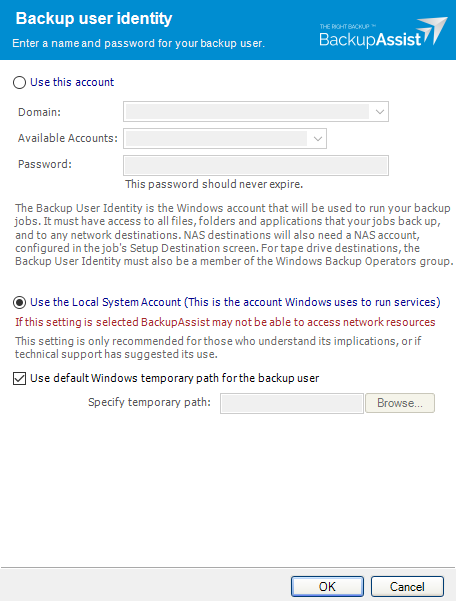
If backup account's password is changed in Windows, it will need to be changed in BackupAssist. You can also use these steps to change the password.
Note
Make sure that the Backup User Identity account has permissions that will give it access to the directories and applications that you are backing up and access to the destination / media that you are backing up to.
For BackupAssist 10.4.3 and later
For BackupAssist 10.4.3 and later, a Backup User Identity is only used when running jobs that have a NAS destination or the SQL add-on. You will be prompted to select an account when creating a job or modifying a job to use a NAS or the SQL add-on. The account selected will be a member of the administrators group and will have the required access.
If you get this error message, check that the account is still selected, enabled and a member of the administrators group.
To learn more, see Backup user identity
Resolution 3
You can tell BackupAssist not report that NTFS security attributes or alternate data streams can't be preserved.
To do this follow the steps below for BackupAssist v7 and v8:
- Open BackupAssist
- Click on the Jobs tab, Manage Menu and select the job you need to change from the list provided.
- Click on Zip Options down the left hand side.
- Un-tick 'Surpress NTFS streams warnings'
To do this follow the steps below for BackupAssist v5 and v6:
- Open BackupAssist
- Click on Jobs at the top of the BackupAssist console and select the particular job you need to change from the list provided.
- Click on Zip Options down the left hand side.
- Un-tick 'Surpress NTFS streams warnings'
| Last updated | Created | Further assistance |
|---|---|---|
| 8th June 2017 | 24th Sep 2009 | BackupAssist Support page |