BA41: Backup user problem - Deny logon locally
| Error code | Product | Applies to |
|---|---|---|
| BA41 | BackupAssist | BackupAssist v4.2 or later |
Description
This error usually indicates that the Backup User Identity that you're using isn't allowed to log on locally.
Resolution
- Go to Administrative Tools > Local Security Policy.
- Click on User Rights Assignment.
- Right click'Deny logon locally' and select Properties and remove the Backup User Identity account from the list and apply the changes.
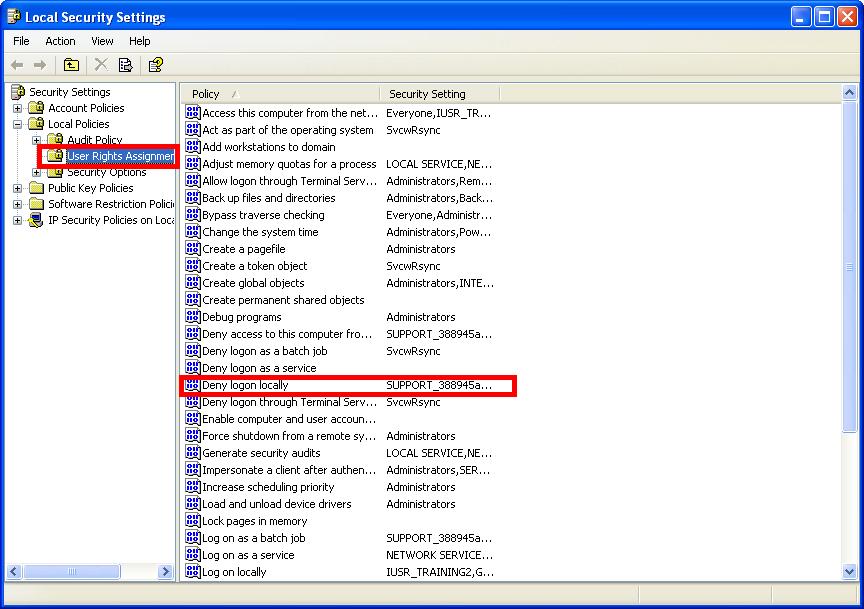
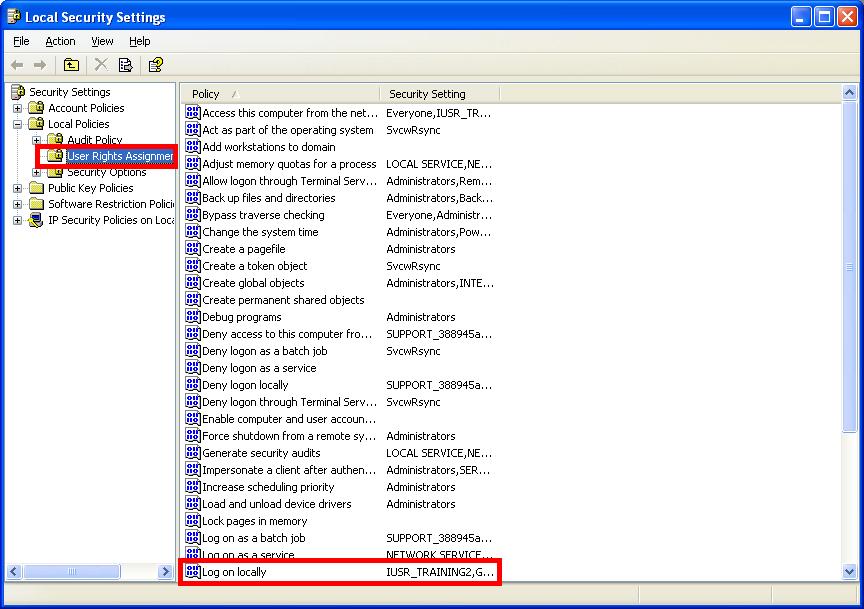
Also, you may like to add the Backup User Identity to the 'Log on locally' list as well. To do this follow the steps below:
- Go to Administrative Tools > Local Security Policy.
- Click on User Rights Assignment.
- Right click 'Log on locally' and select Properties and add the Backup User Identity account to the list and apply the changes.
| Last updated | Created | Further assistance |
|---|---|---|
| 18th Mar 2015 | 27th Sep 2007 | BackupAssist Support page |