BA4806: Cannot create VHDX data container
| Error code | Product | Applies to |
|---|---|---|
| BA4806 | BackupAssist | For BackupAssist 9 or later. |
Description
This error occurs when BackupAssist is not able to create a VHDX Data Container .
Resolution
There are 3 possible resolutions for this problem
Resolution 1 – Check the Backup User Identity's permissions
Check that your Backup User Identity has been set and has the required access. To view your current Backup User Identity, select the Settings tab > Backup User Identity and you'll see the following dialogue box appear.
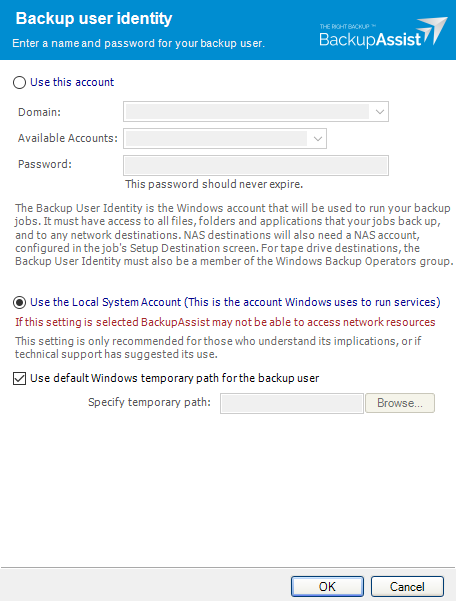
Note
For BackupAssist 10.4.2 and earlier, the Backup User Identity is used for all backup jobs and the account may have been created with custom access levels. For 10.4.3 and later, a Backup User Identity is only required for Jobs that have a NAS destination or the SQL add-on, and in these cases, the Backup User Identity should be a member of the Administrators group.
What to check
- For BackupAssist 10.4.2 or earlier - check that the account is still selected, enabled and has the required access.
- For BackupAssist 10.4.3 and later, check that the account is still selected, enabled and a member of the administrators group.
- To check the permissions properly, you can log into the backup server using the Backup User Identity account and check that you can read and write to the backup destination without any authentication requests or errors.
- If backup account's password is changed in Windows, it will need to be changed in BackupAssist.
To learn more, see Backup user identity
Resolution 2 – Backup destination authentication
The solution applies to backup jobs that attempt to create the Data Container on a network share.
When accessing shares without authentication, you will still need to authenticate with the server / appliance hosting the network share if the shares permissions are set to Everybody or Everyone. This permission only means that all members / groups of that domain / server / device will be able to access the share.
To enable authentication free access you will need to enable Guest permissions on the share, providing your destination support this. In most cases, it is better to create an account, or add specific permissions to an account, that will allow access the share.
Resolution 3 – Sparse Files is configured on the network share
This error can be caused by running a backup to a NAS device that has the sparse file format enabled.
This is a Windows limitation and further information can be found to resolve this in our Windows Server & Linux NAS Sparse File System guide.
| Last updated | Created | Further assistance |
|---|---|---|
| 8th June 2017 | 26 July 2016 | BackupAssist Support page |