BA5003: Shadow Storage size setting was modified after it has been set by BackupAssist
| Error code | Product | Applies to |
|---|---|---|
| BA5003 | BackupAssist | For BackupAssist v8 or later. |
Description
This warning will appear when BackupAssist detects that the Shadow Storage size was changed from the previously set unlimited value.
Resolution
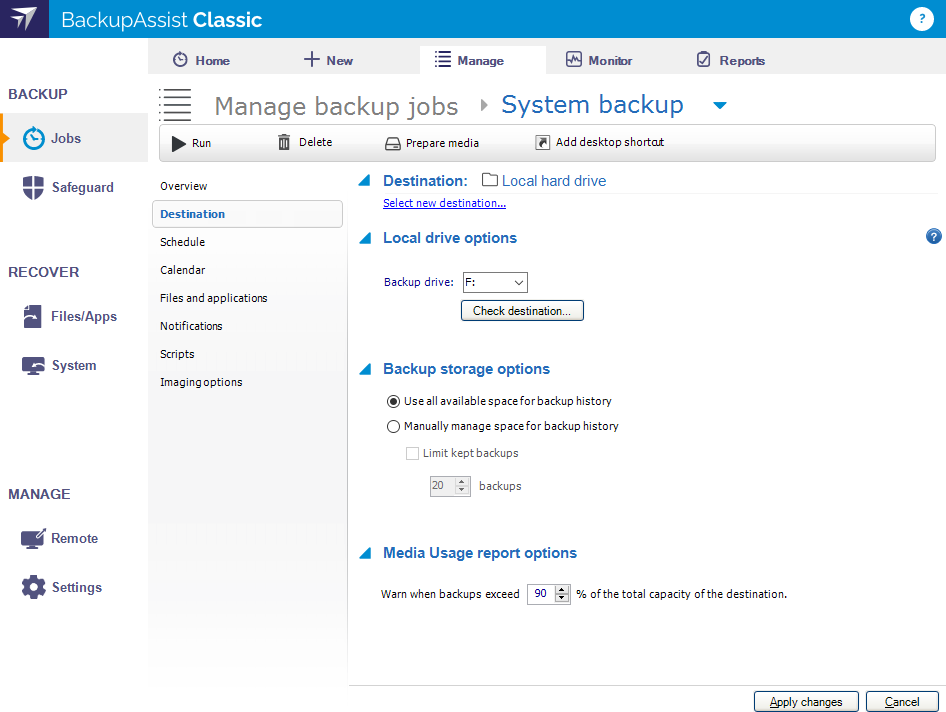
To resolve this issue, go to the Destination screen:
- Select the Jobs tab.
- Select the Manage menu
- Select the backup job
- Select Edit from the top menu
- Select Destination from the left menu.
- Re-select the Backup storage option Use all available space for backup history by switching to Manually manage space for backup history (then select Apply Changes) and then set it back to Use all available space for backup history.
If this doesn't help, i.e. the warning comes back on the future runs, it means that some other application or even Windows changes the Shadow Storage size.
| Last updated | Created | Further assistance |
|---|---|---|
| 13th June 2017 | 04th Aug 2014 | BackupAssist Support page |