BA5100: BitLocker USB media not found
| Error code | Product | Applies to |
|---|---|---|
| BA5100 | BackupAssist | BackupAssist 8.2 and later. |
Description
The USB flash drive that is used to store the BitLocker encryption key is not attached.
Resolution
Attach the USB flash drive for the encryption key.
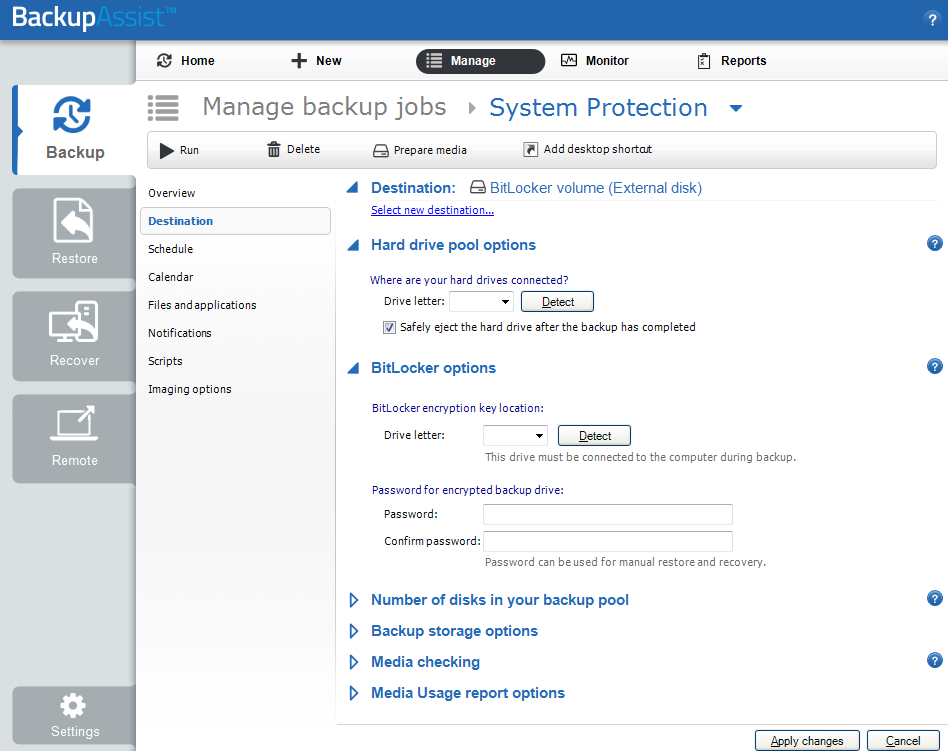
If you receive this error running BackupAssist v10.4.0 or newer; then you’ll need to re-enter the password for the BitLocker volume into the software.
Note
The USB key needs to be connected when updating the password so that it matches correctly.
-
Open BackupAssist
-
Click on Manage Backup Jobs and select the backup job that uses BitLocker encryption.
-
Click on Destination down the left hand side.
-
Re-enter the password and confirm in the boxes provided under BitLocker Options. If you don’t remember the current password, it’s fine to enter a new one at this point.
| Last updated | Created | Further assistance |
|---|---|---|
| 8th June 2018 | 11th Nov 2014 | BackupAssist Support page |