BA6: The Backup did not start as scheduled
| Error code | Product | Applies to |
|---|---|---|
| BA6 | BackupAssist | BackupAssist v9.2 and later |
Description
This error is reported when the BackupAssist service starts up and detects a missed job execution. This can happen if the machine was turned off at the job's scheduled time or if the BackupAssist service wasn't running at that time.
Resolution
There are two possible resolutions to this problem.
Resolution 1 - Rerun the job manually.
If a user clicked on the cancel button on the Manage screen, while a backup job was running, you can rerun the backup job.
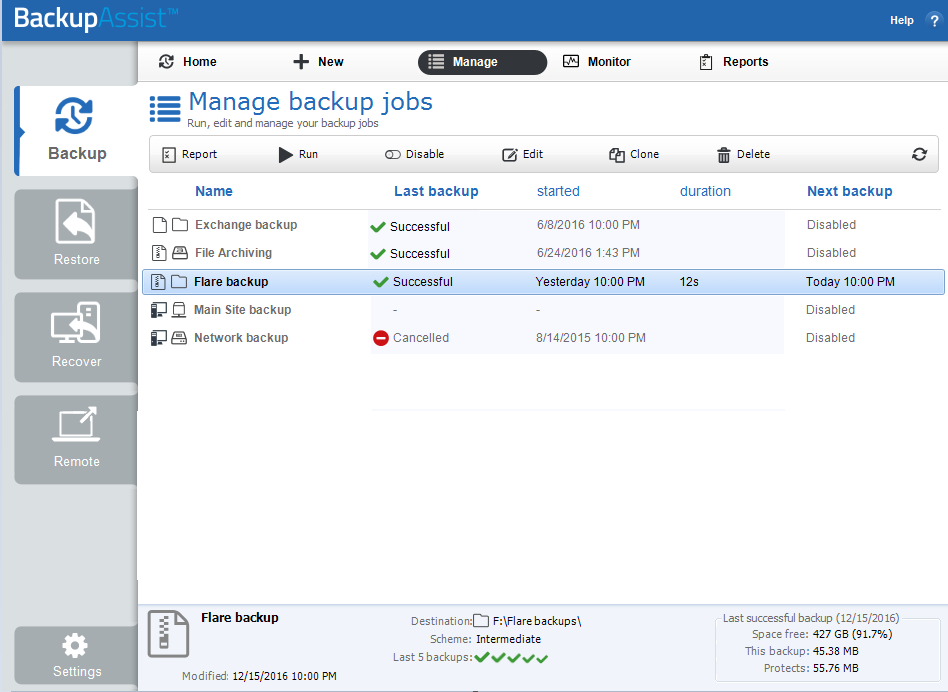
To manually rerun the backup job:
- Open BackupAssist
- Click on Manage Backup Jobs
- Select the backup job from the list provided.
- Click Run on the top menu.
Resolution 2 - Wait until the job's next scheduled execution.
This error can occur if a machine was turned off or unavailable, and the notification will not have been sent until the machine was available again, which may be near the time of the next scheduled backup.
| Last updated | Created | Further assistance |
|---|---|---|
| 15th Dec 2015 | 09th Dec 2015 | BackupAssist Support page |