BA625: Error while zipping backup file.
| Error code | Product | Applies to |
|---|---|---|
| BA625 | BackupAssist | Version 7.0.0 and later |
Description
BackupAssist was unable to finish zipping the backup file.
Resolution
Resolution 1
Allow the backup job to continue as planned and review the results. This error may occur once and never occur again. As a precaution, you should reboot the system before your next backup job runs.
Resolution 2
If this error continues, copy the backup job and run the new copy. If this resolves the problem, disable the backup job with the error, and use the backup job that does not encounter the error.
To create a new copy of a backup job: open BackupAssist > select Manage > right-click the job > select Clone. Give the backup job a different name.
Resolution 3
If the first two resolutions do not help, you will need to send Backupassist a diagnostic report so that our Technical Support team can assist you.
To contact BackupAssist Technical Support and provide diagnostic information, please click on the applicable section below and follow the steps provided.
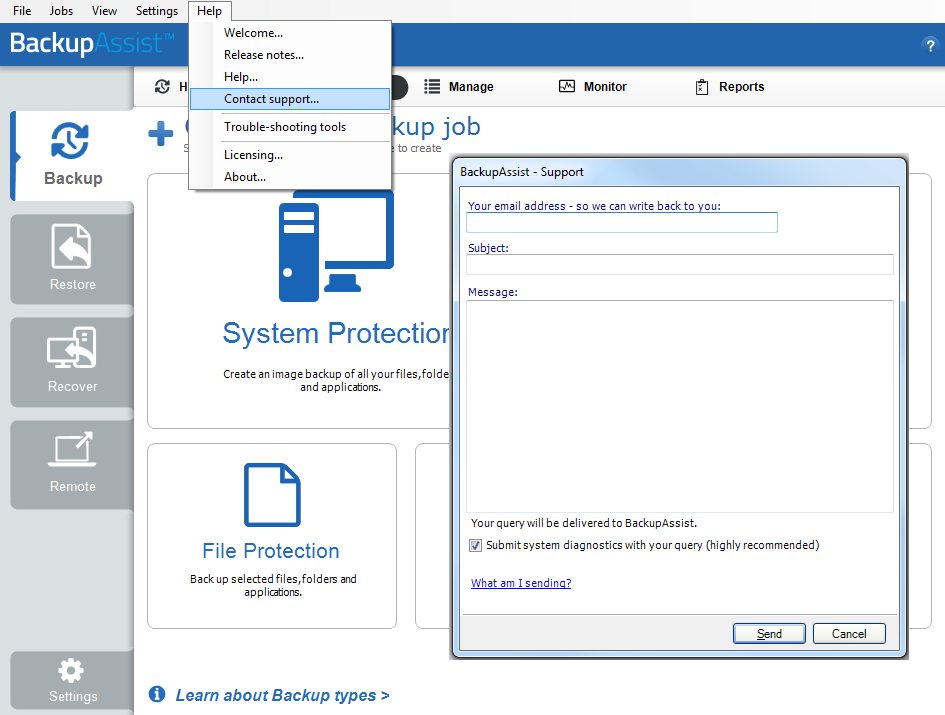
If you are using BackupAssist v9.5.1 or later
- Open BackupAssist.
- Select Help from the menu at the top of the BackupAssist console.
- Select Contact Support ... from the drop-down menu. This will open the BackupAssist - Support dialog.
- Enter the details in the fields provided.
- Make sure the Submit system diagnostics to help with your query tick box is checked. This will zip your BackupAssist settings so technical support can review these specifically for your environment.
- Select Send.
BackupAssist technical support will review your message and diagnostics, and contact you to help resolve the problem.
If you are using BackupAssist v9.5.0 or earlier
- Open BackupAssist.
- Select Help from the menu at the top of the BackupAssist console.
- Select Feedback and Support … from the drop-down menu.
- Select Contact support. This will open the BackupAssist - Support dialog.
- Enter the details in the fields provided.
- Make sure the Submit system diagnostics to help with your query tick box is checked. This will zip your BackupAssist settings so technical support can review these specifically for your environment.
- Select Send.
BackupAssist technical support will review your message and diagnostics, and contact you to help resolve the problem.
If you have any issues using our automated support tool please follow these steps to manually send in your diagnostics file:
1. Go to C:\Documents and Settings\All Users\Application Data (server 2003/XP) or C:\ProgramData\ (server 2008/Vista/Win7)
2. Find the BackupAssist folder, zip up the version of the following folder: BackupAssist vX (Where X is the version that you are running)
3. Once you've zipped up all the folders needed please go to our manual submission website that will collect the data and send to us:
http://www.backupassist.com/BackupAssist/diags/submit.php.
| Last updated | Created | Further assistance |
|---|---|---|
| 20th Aug 2014 | 15th Dec 2008 | BackupAssist Support page |