BA7011: Cloud backup chunk identification error
| Error code | Product | Applies to |
|---|---|---|
| BA7011 | BackupAssist | For BackupAssist 10.0.2 or later. |
Description
This error occurs due to a fault in the BackupAssist Cloud Backup Garbage Collector process. The Garbage Collector cleans up chunks from old backups that don’t belong to any of the current backups in the cloud container. It may identify a chunk as deletable when it belongs to a valid current backup.
As a safety net, BackupAssist compares the Garbage Collector delete-list with the list of chunks backed up by the current backup. If there is an overlap, BackupAssist overrides the Garbage Collector decision to delete the chunk in question, and raises this warning in the backup report. For diagnostic purposes, the event is also logged in the diagnostic logs.
Resolution
No resolution is required from the user. However escalating this issue to the BackupAssist support team along with system diagnostics will help us improve our Garbage Collector technology and improve the performance of the overall Cloud Backup functionality.
To contact BackupAssist Technical Support and provide diagnostic information, please click on the applicable section below and follow the steps provided.
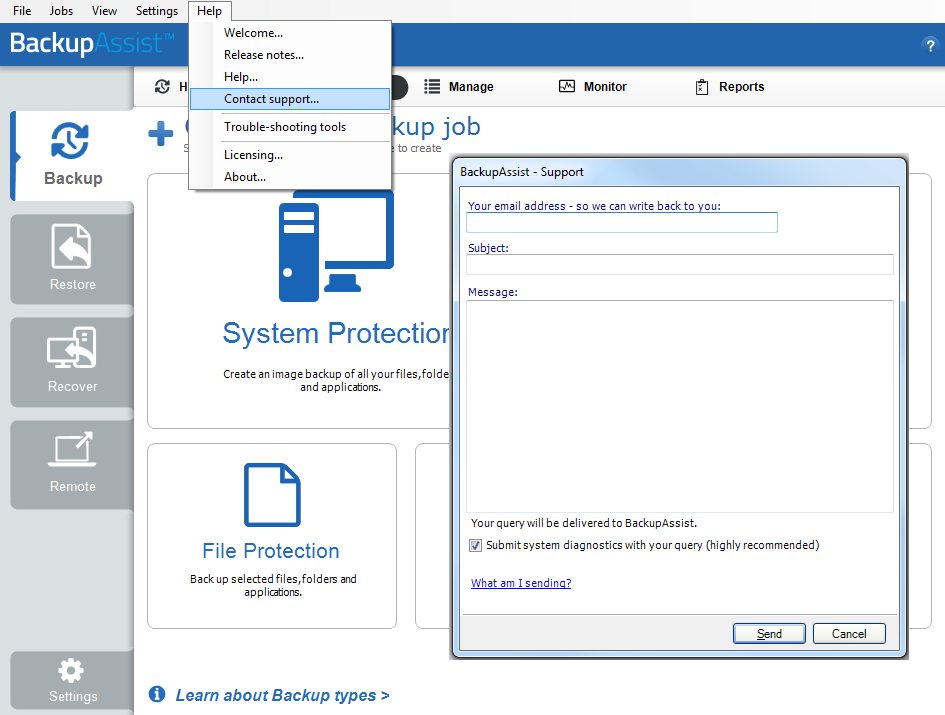
If you are using BackupAssist v9.5.1 or later
- Open BackupAssist.
- Select Help from the menu at the top of the BackupAssist console.
- Select Contact Support ... from the drop-down menu. This will open the BackupAssist - Support dialog.
- Enter the details in the fields provided.
- Make sure the Submit system diagnostics to help with your query tick box is checked. This will zip your BackupAssist settings so technical support can review these specifically for your environment.
- Select Send.
BackupAssist technical support will review your message and diagnostics, and contact you to help resolve the problem.
If you are using BackupAssist v9.5.0 or earlier
- Open BackupAssist.
- Select Help from the menu at the top of the BackupAssist console.
- Select Feedback and Support … from the drop-down menu.
- Select Contact support. This will open the BackupAssist - Support dialog.
- Enter the details in the fields provided.
- Make sure the Submit system diagnostics to help with your query tick box is checked. This will zip your BackupAssist settings so technical support can review these specifically for your environment.
- Select Send.
BackupAssist technical support will review your message and diagnostics, and contact you to help resolve the problem.
| Last updated | Created | Further assistance |
|---|---|---|
| 3rd July 2017 | 3rd July 2017 | BackupAssist Support page |