BA709: Too many warning occurred - aborted backup
| Error code | Product | Applies to |
|---|---|---|
| BA709 | BackupAssist | BackupAssist v6 and later |
Description
This error can occur when there are multiple backup warnings generated during the backup process. These warnings usually occur when there are too many skipped files.
Resolution
Review the backup report as it will show which files were skipped and the reason why they were skipped.
Also review the KB article BA705 One or more files were skipped for further information
The number of skipped files that can occur before this error is produced can be adjusted within the backup job.
The steps to do this are:
- Open BackupAssist.
- Select Manage Backup Jobs
- Select the backup job.
- Select Edit from the top menu
- Select Replication Options from the options on the left
- Change the Maximum skipped files value to a larger figure (100 is the default).
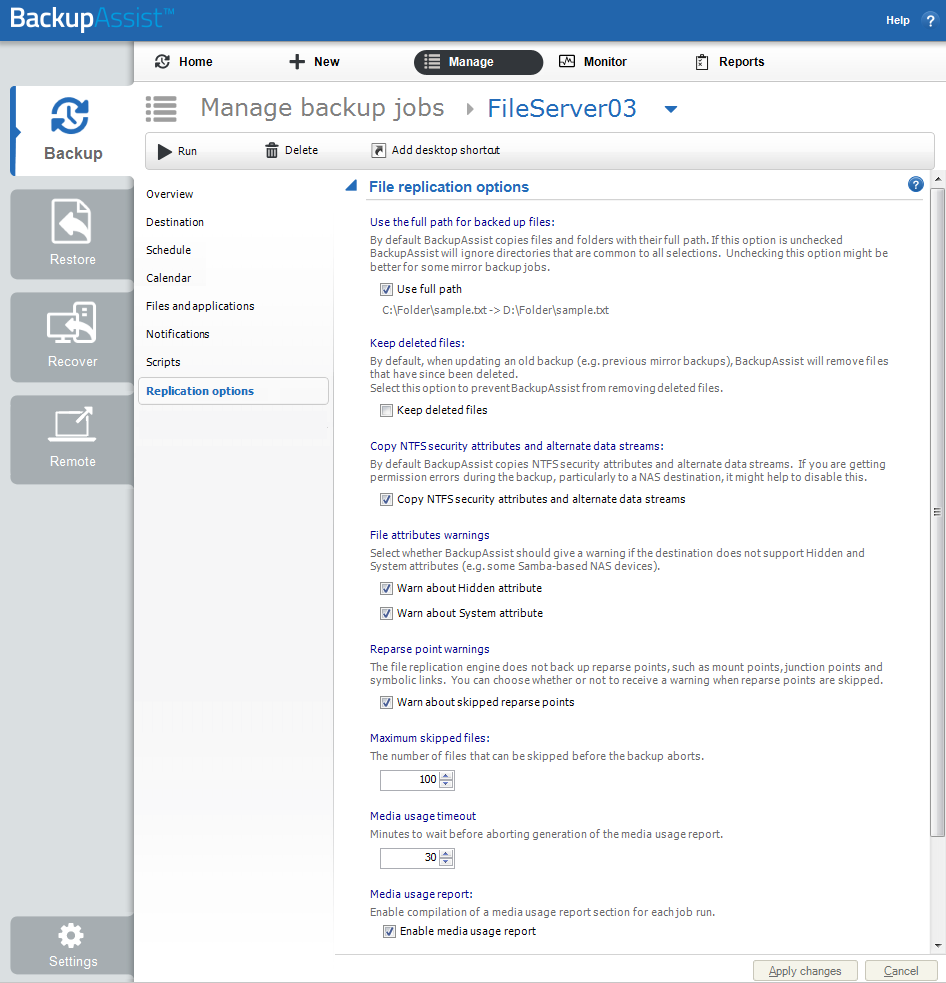
To learn more see Edit Job : Replication Options
| Last updated | Created | Further assistance |
|---|---|---|
| 3rd Mar 2016 | 02nd Oct 2008 | BackupAssist Support page |