BA722: Destination does not support the Hidden attribute
| Error code | Product | Applies to |
|---|---|---|
| BA722 | BackupAssist | BackupAssist v5 and later |
Description
The backup destination being used does not support NTFS attributes. The selected files will still be backed up correctly, but the NTFS attributes will not be included in the backup.
Resolution
Resolution 1 - Use a destination that is NTFS formatted
The destination does not support NTFS attributes because only an NTFS format can hold these attributes correctly. If they are needed, back up to a destination formatted with NTFS or format the current destination as NTFS.
For more information visit http://www.backupassist.com/blog/support/are-ntfs-data-streams-and-attributes-supported-by-your-backup-destination
Resolution 2 - Turn off the warning
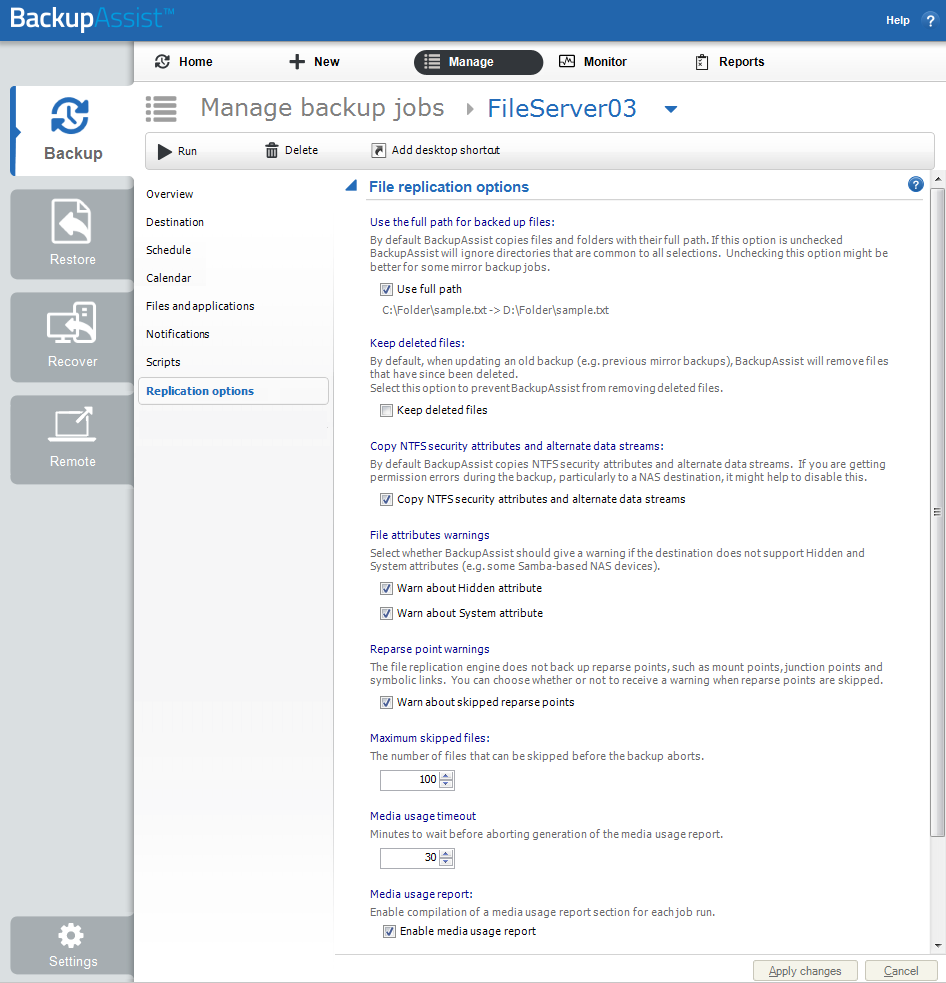
BackupAssist can be stopped from generating this warning by following the steps below:
- Open BackupAssist.
- Select Manage Backup Jobs.
- Select the backup job.
- Select Edit from the top menu
- Select Replication from the options on the left..
- Under File attribute warnings, untick Warn about hidden attribute.
| Last updated | Created | Further assistance |
|---|---|---|
| 05th Jun 2015 | 17th Feb 2009 | BackupAssist Support page |