BA724: Could not create hard link - copying file instead
| Error code | Product | Applies to |
|---|---|---|
| BA724 | BackupAssist | BackupAssist v5.2.1 or later |
Description
This warning occurs when BackupAssist isn't able to create a hard link to a particular file which using Single Instance Store.There are certain combination's of security settings which prevent files from being hard linked.
Resolution
This is just a warning to state that BackupAssist couldn't link the file (to save space while using Single Instance Store) so a straight copy of the file was made. This can be caused by the Backup User Identity not having full access to the directory where the file is located. A copy of the file is still possible with the way BackupAssist uses the Windows API's, however there are no way for BackupAssist to set read/write permissions due to security reason within Windows.
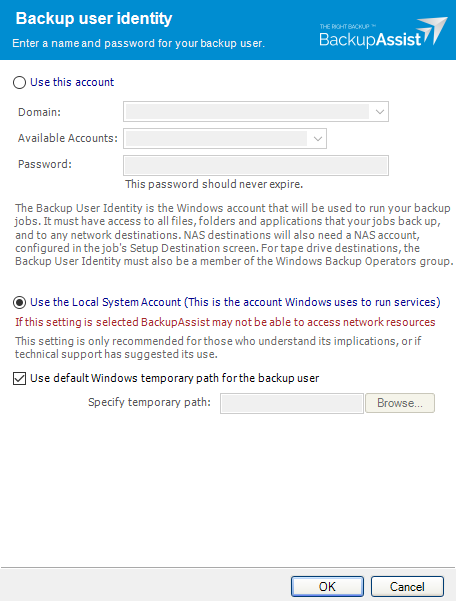
Check that your Backup User Identity has been set and has the required access. To view your current Backup User Identity, select the Settings tab > Backup User Identity and you'll see the following dialogue box appear.
Note
For BackupAssist 10.4.2 and earlier, the Backup User Identity is used for all backup jobs and the account may have been created with custom access levels. For 10.4.3 and later, a Backup User Identity is only required for Jobs that have a NAS destination or the SQL add-on, and in these cases, the Backup User Identity should be a member of the Administrators group.
What to check
- For BackupAssist 10.4.2 or earlier - check that the account is still selected, enabled and has the required access.
- For BackupAssist 10.4.3 and later, check that the account is still selected, enabled and a member of the administrators group.
- To check the permissions properly, you can log into the backup server using the Backup User Identity account and check that you can read and write to the backup destination without any authentication requests or errors.
- If backup account's password is changed in Windows, it will need to be changed in BackupAssist.
To learn more, see Backup user identity
Another cause of this could be the Backup User needs to have the "write attributes" permission to the source file. You need to go into "advanced" security settings to set this permission. If you want to change permissions to avoid the "linking" warning,you will also need to change them on the most recent existing backup.
| Last updated | Created | Further assistance |
|---|---|---|
| 8th July 2017 | 17th Mar 2009 | BackupAssist Support page |