BA8008: The creation of a temporary CryptoSafeGuard Hyper-V guest checkpoint timed out
| Error code | Product | Applies to |
|---|---|---|
| BA8008 | BackupAssist | For BackupAssist 10.1.3 or later. |
Description
The temporary Hyper-V guest checkpoint (created during a CryptoSafeGuard scan) has been left instead of being deleted. If this keeps happening, the Hyper-V host machine could run out of storage.
Resolution
On Windows Server 2012 and later, BackupAssist will attempt to remove the checkpoints automatically.
This can also be done manually using the following process.
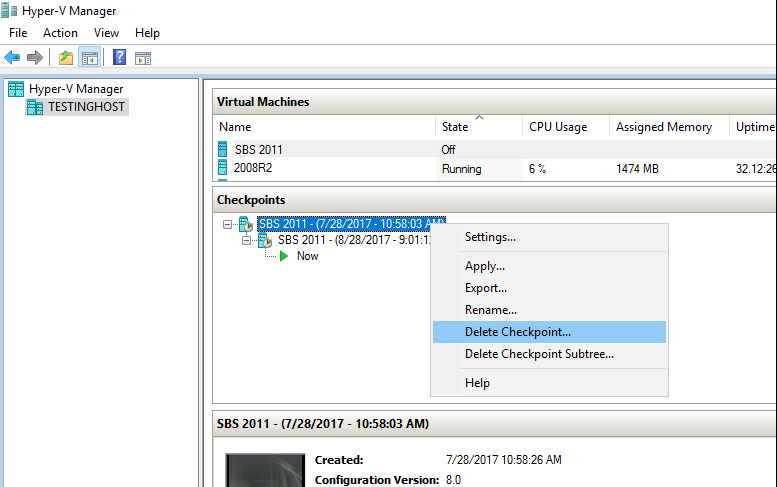
Open the Hyper-V Manager and delete any guest (VM) checkpoints that don't look like they should be there (e.g. the user doesn't remember creating them / they correspond with a scheduled backup execution). To delete a checkpoint, select the VM in Hyper-V Manager and right click the checkpoint as shown below. Delete Checkpoint will appear as an option.
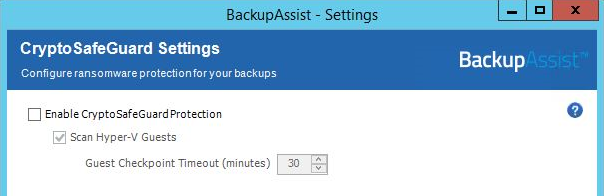
If, for whatever reason, you don't want to receive checkpoint timeout messages, the only way available is to reconfigure the CryptoSafeGuard Settings for your backups to either disable CryptoSafeGuard scanning of Hyper-V Guests (NOT recommended) or to increase the "Guest Checkpoint Timeout (minutes)" which would increase backup times viz:
To learn more, see BackupAssist CryptoSafeGuard
| Last updated | Created | Further assistance |
|---|---|---|
| 8th January 2018 | 28th September 2017 | BackupAssist Support page |