BA8010: Deletion of a temporary CryptoSafeGuard Hyper-V guest checkpoint failed
| Error code | Product | Applies to |
|---|---|---|
| BA8010 | BackupAssist | For BackupAssist 10.2.2 or later. |
Description
CryptoSafeGuard was not able to delete a temporary Hyper-V guest checkpoint after completing a scan. The checkpoint should be manually deleted.
Resolution
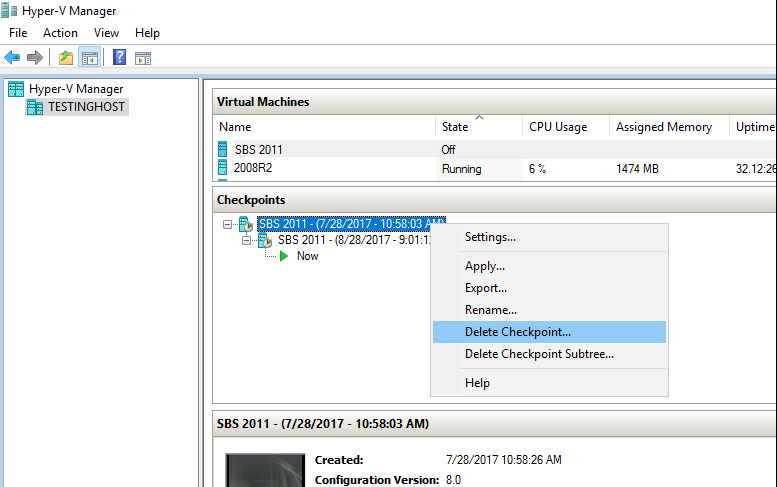
The user should remove the temporary guest checkpoint using the Hyper-V Manager on the Hyper-V host.
To delete a checkpoint, select the VM in Hyper-V Manager and right click the checkpoint as shown below. Delete Checkpoint will appear as an option.
| Last updated | Created | Further assistance |
|---|---|---|
| 27th Nov 2017 | 27th Nov 2017 | BackupAssist Support page |