BA1: Unhandled exception in the Backup Executor
| Error code | Product | Applies to |
|---|---|---|
| BA1 | BackupAssist | BackupAssist v4 and later |
Description
The reason for this error is that the BAExecutorWinApp.exe process was stopped without any warning.
Resolution
The error's known causes and resolutions are described below.
Known Cause 1 - Backup User Identity does not contain correct permissions
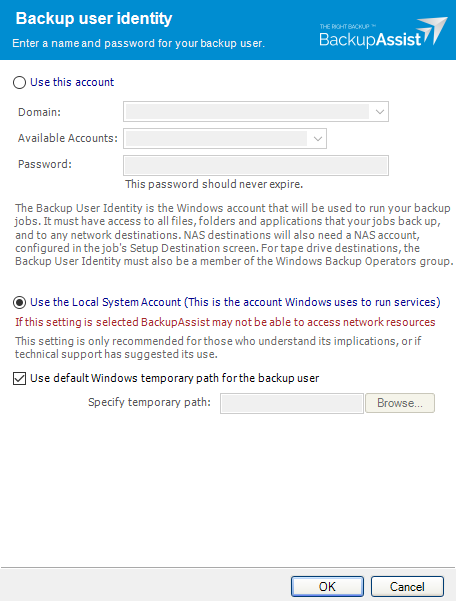
Check that your Backup User Identity has been set and has the required access. To view your current Backup User Identity, select the Settings tab > Backup User Identity and you'll see the following dialogue box appear.
Note
For BackupAssist 10.4.2 and earlier, the Backup User Identity is used for all backup jobs and the account may have been created with custom access levels. For 10.4.3 and later, a Backup User Identity is only required for Jobs that have a NAS destination or the SQL add-on, and in these cases, the Backup User Identity should be a member of the Administrators group.
What to check
- For BackupAssist 10.4.2 or earlier - check that the account is still selected, enabled and has the required access.
- For BackupAssist 10.4.3 and later, check that the account is still selected, enabled and a member of the administrators group.
- To check the permissions properly, you can log into the backup server using the Backup User Identity account and check that you can read and write to the backup destination without any authentication requests or errors.
- If backup account's password is changed in Windows, it will need to be changed in BackupAssist.
To learn more, see Backup user identity
Known Cause 2 - Backup destination failure
If you are backing up over a network, try using an alternate destination. This will help isolate the issue, which may be related to the backup configuration or the selected destination.
You should also run consistency checks and defragmentation on all backup media.
Please review the following document from Microsoft on the use of chkdsk: https://technet.microsoft.com/en-us/magazine/ee872425.aspx
It's also recommended to perform a defragmentation of your destination drives as well. More information on this process is located at http://windows.microsoft.com/en-au/windows/improve-performance-defragmenting-hard-disk#1TC=windows-7.
Known Cause 3 - Process conflicts
Processes that are running at the same time as BackupAssist can interfere and could cause this error.
Check that you are not running the following processes at the same time as your backup job:
-
Anti-virus scans (including live scanning features)
It is recommended that all anti-virus processes are disabled while the backup job is running to avoid any conflicts. If you are not sure how to configure this, you may need to contact your anti-virus vendor for assistance.
Try placing an exception for BackupAssist within or disable your anti-virus software and run the backup again to see if the error is generated again. If it is, then it means that your anti-virus is marking BackupAssist as a threat to your system. To re-configure your anti-virus avoid such a conflict, we recommend that you contact your anti-virus support vendor for further advice.
-
Defragmentation processes
More information on this process is located at http://windows.microsoft.com/en-au/windows/improve-performance-defragmenting-hard-disk#1TC=windows-7.
-
Consistency checks such as chkdsk scans
Please review the following document from Microsoft on the use of chkdsk: https://technet.microsoft.com/en-us/magazine/ee872425.aspx
If any of the problems described in the article are occurring, reschedule one of the processes to a later time to avoid the conflict.
Known Cause 4 - PST Mailbox backups
This is a known error in BackupAssist v8.4.1 that occurs with PST Mailboxes embedded in System Protection, File Protection or File Archiving backups.
Solution: Update to the latest version of BackupAssist from our BackupAssist download page.
| Last updated | Created | Further assistance |
|---|---|---|
| 8th June 2017 | 16th Mar 2007 | BackupAssist Support page |