BA1883: Insufficient privileges to the Exchange Server.
End of life
Mailbox Protection reached end of life on 28 February 2017 and is not part of BackupAssist v10 and later. This article applies to BackupAssist v9 and earlier, which no longer receive technical support. See Software end of life.
| Error code | Product | Applies to |
|---|---|---|
| BA1883 | BackupAssist | BackupAssist v4 to v8.4. |
Description
This error usually indicates that there is an issue with accessing the Exchange Information Store when trying to backup an Exchange Server.
Resolution
There are 2 possible resolutions to this problem/
Resolution 1 – Review and update the permissions
Configure a Backup User Identity using the information specified in this Exchange Mailbox backup article.
Check that your Backup User Identity has been set and has the required access. To view your current Backup User Identity, select the Settings tab > Backup User Identity and you'll see the following dialogue box appear.
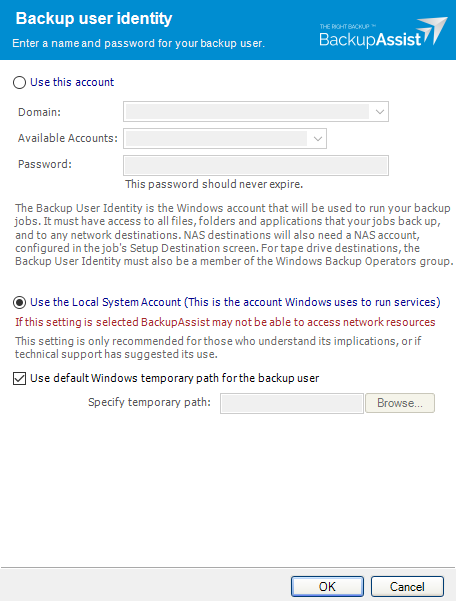
Note
For BackupAssist 10.4.2 and earlier, the Backup User Identity is used for all backup jobs and the account may have been created with custom access levels. For 10.4.3 and later, a Backup User Identity is only required for Jobs that have a NAS destination or the SQL add-on, and in these cases, the Backup User Identity should be a member of the Administrators group.
What to check
- For BackupAssist 10.4.2 or earlier - check that the account is still selected, enabled and has the required access.
- For BackupAssist 10.4.3 and later, check that the account is still selected, enabled and a member of the administrators group.
- To check the permissions properly, you can log into the backup server using the Backup User Identity account and check that you can read and write to the backup destination without any authentication requests or errors.
- If backup account's password is changed in Windows, it will need to be changed in BackupAssist.
To learn more, see Backup user identity
Resolution 2 – Delegate Control / Full Access Rights
If configuring the Backup User Identity in Resolution 1 does not resolve the issue, you may need to give the Backup User Identity Full access control on the mailboxes within the Exchange Server.
To do this, select the appropriate link below:
- If you are running Exchange 2003 or Exchange 2007, refer to KB Article BA1752
- If you are running Exchange 2010 or later, refer to http://technet.microsoft.com/en-us/library/bb124097.aspx
| Last updated | Created | Further assistance |
|---|---|---|
| 8 June 2017 | 17th Jun 2009 | BackupAssist Support page |